Does an MP4 download guarantee no watermark?
No. File format and visible branding are separate properties. Check current export conditions and inspect the complete downloaded file rather than inferring branding from the extension.
SPICYFRAME · PRACTICAL GUIDES
Check watermark and download conditions for adult glamour video, distinguish preview branding from delivered files, and verify the final export before use.
5 seconds · 480p · $3.99. Pay per video, no subscription required.
Updated

An NSFW AI video generator with no watermark is a search for a particular deliverable, not a complete description of quality or rights. For non-explicit adult glamour, the useful question is whether the authorized finished file meets your layout and publication needs. A clean preview does not establish that the downloaded file is unbranded, and a branded preview does not prove every export carries the same mark. This guide does not promise watermark removal or an unverified export condition for a provider. Check the current product information and the actual file. Keep the original result intact while reviewing it, especially if the asset will be used in a client campaign or combined with other footage.
A visible logo in a corner, a full-frame preview overlay and an end card are different forms of branding. Metadata or provenance information can exist without being visible during playback. A statement about no visible watermark does not establish that a file has no metadata, no AI disclosure requirement or no restrictions on use. Likewise, removing visible branding would not create rights you did not have. Record the exact requirement from the destination: perhaps the layout needs a clear lower corner, or perhaps a client requires an original licensed export. Ask that requirement directly rather than using “clean” as an ambiguous shorthand. This makes the review about the actual file and intended placement.
Read whether the export condition depends on account type, paid tier, resolution, trial status or another documented factor. Do not assume a general advertisement applies to every generation. A free preview may be subject to different conditions from a paid download, and a promotional offer may have an expiry date. Keep the relevant terms with the project if the condition affects a purchase decision. For SpicyFrame, verify any current watermark statement rather than inferring one from the fact that the output is an MP4. The pay-as-you-go guide explains the purchase model, but a payment model alone does not answer every question about branding or publication rights.
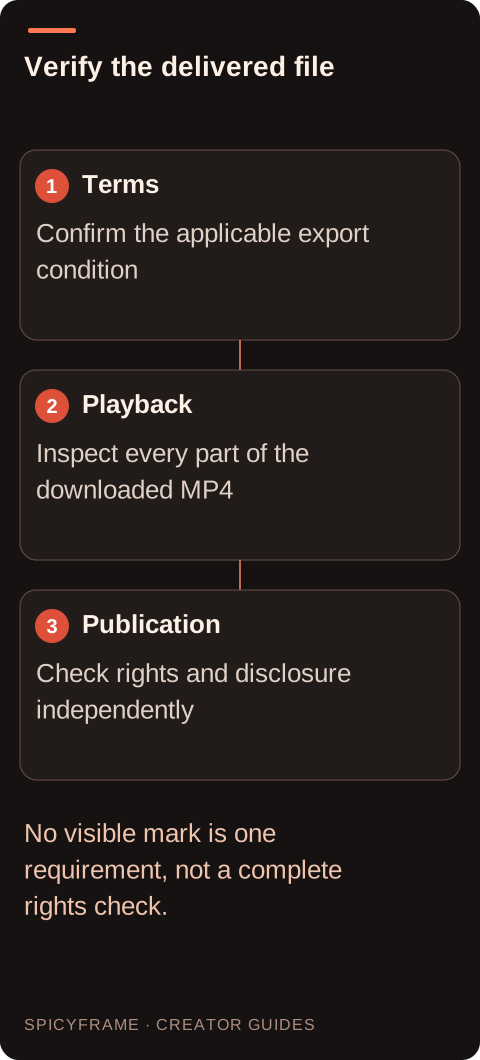
Review the actual MP4 from beginning to end at the intended display size. Check all corners, the center, transitions and the final frames. A mark may appear only during part of a sequence, while a browser player overlay may disappear when the file is played locally. Pause on a few contrasting frames because pale branding can be hard to see against bright clothing or dark backgrounds. Confirm duration, dimensions and sound at the same time. Do not use a screenshot of the player as evidence of what is embedded in the video. The video delivery guide helps connect file review with vertical publication, where interface overlays from the destination may create separate layout constraints.
A fashion clip often needs room for a face, full garment silhouette and a brand title added later. Plan that space before generation. If a visible mark occupies a critical area, obtain an appropriate authorized export or reconsider the asset rather than treating destructive cropping as a universal fix. Cropping can remove hands, jewelry or the garment hem and change the intended composition. External editing may add your own title or campaign graphics where you have the right to do so, but it does not automatically authorize removing someone else's attribution or branding. Keep source permissions and export conditions together. The vertical framing guide explains why small edge changes can have large visual consequences in a narrow frame.
Suppose a fashion client needs a ten second adult eveningwear teaser with a campaign title in the lower third. Before buying generation, the plan is to confirm the output and branding conditions, reserve enough garment space above the title area and keep the brief non-explicit. After delivery, the reviewer plays the downloaded file locally and checks the lower corners and final frame before adding typography externally. This is a proposed quality-control process, not a tested export claim. If an unexpected mark conflicts with the layout, the next step is to verify the applicable terms or contact official support with order details. The plan does not assume that a removal tool is either necessary or authorized.
A file can be free of visible branding yet still contain changing faces, unstable clothing or unusable text. It can also be visually excellent while lacking permission for the source photograph or the intended commercial use. Keep separate acceptance checks for image quality, output conditions and rights. SpicyFrame's relevant output is a single vertical 9:16 MP4 with ambient sound, in 5, 10 or 30 seconds at 480p, 720p or 1080p. Those specifications do not guarantee exact likeness or garment continuity. The fashion video guide adds useful temporal checks. Do not let one attractive export condition distract from whether the adult glamour scene actually works through the full sequence.
Save the original downloaded file, the order information, the terms relevant to export and the externally edited final version separately. Use filenames that distinguish the source clip from the branded campaign version you create. If a client later asks whether an overlay came from the generator, your editor or the publication platform, that record makes the answer easier to establish. Confirm any AI disclosure or attribution requirement for the destination independently of visible watermark status. A clean presentation is a production choice; trustworthy delivery comes from knowing what the file contains, what you are permitted to do with it and how later edits changed it. That is more useful than a blanket promise attached to a search phrase.
| Requirement | Decision | Evidence to check |
|---|---|---|
| Preview shows a corner logo | Inspect the downloaded file | Player overlay and embedded mark are distinguished |
| Advertisement says no watermark | Read applicable export conditions | Plan and generation type are covered |
| Client title needs clear space | Plan the vertical layout first | Garment and face remain readable |
| Unexpected mark appears in delivery | Verify terms and official support | No unauthorized removal is assumed |
| File looks unbranded | Check rights and disclosure separately | Visual cleanliness is not treated as permission |
No. File format and visible branding are separate properties. Check current export conditions and inspect the complete downloaded file rather than inferring branding from the extension.
Not always. A browser overlay can differ from the file itself. Play the downloaded video locally and inspect the frames to identify what is actually part of the asset.
No. Metadata, attribution and publication disclosure requirements are separate questions. Check the relevant terms and destination rules even when no branding appears during playback.
First obtain or verify an authorized export. Cropping can damage composition and does not itself establish permission to remove attribution or branding from someone else's asset.
Check the full sequence, corners and final frames, plus dimensions, duration, sound, visual continuity and rights. Keep the original export separate from later campaign edits.
No. It provides an export review method and does not claim a removal feature or an unverified watermark condition. Confirm the current product information before relying on it.