Can adult glamour artwork stay illustrated in video?
Describe the visible style explicitly and avoid conflicting realism cues, then review the full sequence. Style preservation is a creative goal, not a guaranteed result from the source alone.
SPICYFRAME · PRACTICAL GUIDES
Animate non-explicit adult glamour artwork while keeping its illustrated style, with checks for linework, color, clothing and accidental photorealism.
5 seconds · 480p · $3.99. Pay per video, no subscription required.
Updated

An NSFW AI art generator may produce an adult glamour illustration, but animating that image is a separate creative task. Here the goal is non-explicit fashion artwork with clearly adult characters: an eveningwear illustration, a painted nightlife portrait or a stylized editorial figure. Decide whether the video should remain illustrated or intentionally move toward another look. If preservation matters, name the visible medium and rendering style rather than relying on the source alone. “Keep the flat color shapes and clean ink outlines” communicates more than “make it cinematic.” The latter can imply lighting and surface detail that compete with the original art. A successful brief explains what should move and what visual language should remain.
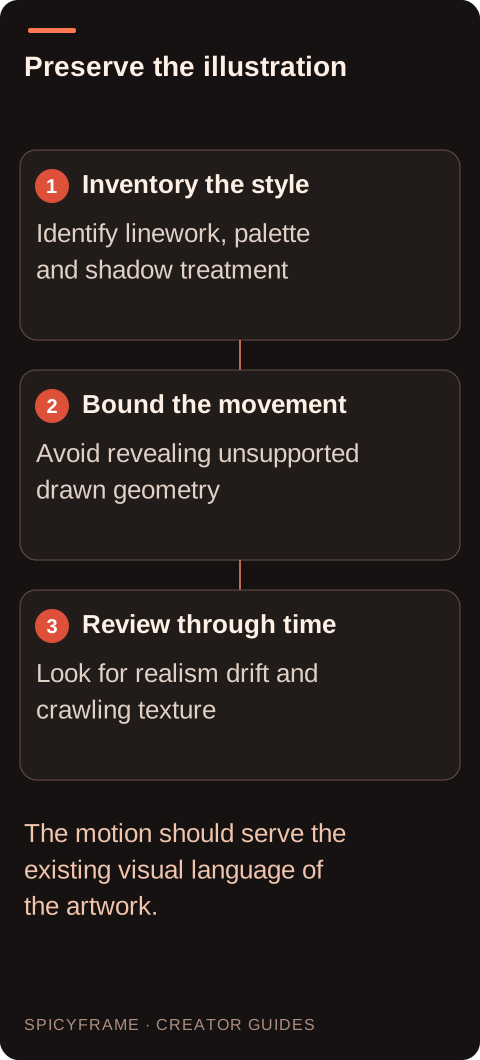
Study line weight, palette, shadow design, texture and proportions. A fashion illustration may use elongated forms, simplified hands and large blocks of color deliberately. Those are not defects that necessarily need photorealistic correction. List the two or three features whose loss would change the artwork's identity. For example, a red and black palette, crisp jacket outlines and a textured paper finish might be essential. The animate AI images guide covers the broader workflow, but style preservation requires this more specific inventory. If you cannot describe the original look without naming an artist, focus on observable features instead of assuming a style label will communicate every aspect of the image.
Illustrations often imply depth rather than fully describing it. A profile may omit an eye, a coat may be represented by one contour, and a hand may have only a few marks. Large rotations require the generator to invent new views of those simplified forms. A gentle shift of gaze, subtle fabric movement or restrained background light change asks for less unseen construction. Keep the camera steady if the composition depends on precise graphic balance. The camera movement guide helps distinguish a small subject action from a camera move that reveals new geometry. Do not assume a dramatic orbit will preserve a two dimensional design merely because the opening frame looks faithful.
Export a clear supported still rather than a screenshot of an art application. Remove interface panels, selection outlines and transparency checkerboards outside SpicyFrame. If the artwork has alpha transparency, choose and prepare a background that fits its palette before generation when a finished scene is the goal. SpicyFrame's MP4 output is not a promised transparent animation asset. Check thin lines at the actual upload size; very fine strokes can disappear or flicker when the subject moves. Avoid aggressive sharpening that creates bright halos around ink contours. Keep the original layered artwork separately so you can revise the composition later without repeatedly processing a flattened or compressed copy.
Suppose you have an authorized illustration of a fictional adult in a long red coat against a dark violet background. The style uses flat shadows, bold outlines and a paper texture. A possible brief is: “Clearly adult illustrated fashion character in the same long red coat, one small shift of posture, bold ink outlines and flat painted shadows retained, restrained paper texture, still vertical composition.” This is a proposed concept, not a tested result. It avoids asking for realistic skin pores or complex lens effects that could pull the output toward photography. The review would focus on the coat contour, facial design and consistent graphic treatment through the movement.
Additional artwork can help only when it describes the intended character and costume consistently. A painterly portrait and a flat vector version of the same character may introduce competing style evidence. Choose a primary visual direction and keep alternative treatments out of that generation brief. SpicyFrame accepts up to 12 authorized JPG, PNG or WebP images under 10 MB each, but the limit is not a target. If another view is included, explain what it clarifies, such as the coat silhouette or the character's profile. The multiple reference guide helps organize that evidence. Additional views do not guarantee consistent character identity or exact reconstruction of details absent from the artwork.
Watch for outlines that thicken and thin, paper texture that crawls, flat shadows that become glossy gradients, and painted faces that gradually acquire photographic skin. These are style continuity problems even when the basic subject remains recognizable. Inspect several moments, then play the sequence normally to assess whether the changes distract. If realism appears unintentionally, remove conflicting prompt language and reinforce the specific illustrated features you want to keep. If linework flickers, consider a cleaner source and a smaller movement rather than adding more texture instructions. The artifact guide offers a useful diagnosis framework, but the acceptance standard should include the artwork's visual grammar as well as anatomy and motion.
SpicyFrame produces a single vertical 9:16 MP4 with ambient sound in 5, 10 or 30 seconds. Exact frame timing, transparent delivery, typography and compositing into a larger design may require external tools. Choose duration according to the action rather than assuming a longer clip better preserves the illustration. If text in the artwork must remain exact, add it during external finishing instead of relying on generated lettering. Keep the source license and any permissions with the project, including rights for the fictional character or commissioned art where relevant. A useful adult glamour animation respects the intended illustration and its authorial context while making clear that the new movement is generated interpretation, not hand-authored continuity guaranteed by the still.
| Requirement | Decision | Evidence to check |
|---|---|---|
| Flat color illustration | Name outlines and shadow design | No accidental photographic texture appears |
| Fine ink lines define the outfit | Use a clear source and modest motion | Contours remain stable over time |
| Transparent artwork needs one scene | Prepare the backdrop externally | No checkerboard is baked into the reference |
| References use different art styles | Select one coherent direction | The model receives consistent visual evidence |
| Exact lettering is essential | Add text through external finishing | Spelling and shape remain controlled |
Describe the visible style explicitly and avoid conflicting realism cues, then review the full sequence. Style preservation is a creative goal, not a guaranteed result from the source alone.
Use observable features such as bold outlines, flat shadows, a limited palette, painted texture or simplified forms. These help define what should remain consistent during movement.
The prompt may ask for realistic surfaces or cinematic effects that conflict with the source. Simplify those cues and specify the illustrated features that matter to the project.
Do not assume so. Prepare a complete background for a finished MP4, or plan a separate external animation and compositing workflow when transparent delivery is required.
They can create conflicting evidence. Prefer consistent views of the same character and design, and keep alternative visual treatments in separate briefs unless a deliberate mixture is intended.
A small posture change or restrained fabric movement asks for less unseen geometry than a large turn or orbit. Choose an action that respects the drawing's simplified structure.