Has Grok spicy mode been removed everywhere?
This guide does not establish that. A missing option on one account or interface is not proof of universal removal; current official notices are the relevant evidence.
SPICYFRAME · PRACTICAL GUIDES
Investigate a missing Grok spicy option by separating interface access, account conditions and moderation, using official facts instead of unlock claims.
5 seconds · 480p · $3.99. Pay per video, no subscription required.
Updated

“Grok spicy mode gone” can describe several experiences: a style control is absent, image creation is unavailable, a particular request is refused, or an old tutorial no longer matches the current interface. Those observations do not establish the same cause. Start by writing down exactly what changed and where you observed it. This guide does not claim that a current Spicy control is universally available or universally removed. The official X Help page confirms general Grok access on X across iOS, Android and web, but does not provide a current consumer Spicy availability matrix. The broader Grok spicy guide supplies background; the task here is diagnosing a specific missing function without inventing an explanation.
Record whether you are using Grok within X, a standalone Grok experience or another interface that claims to connect to it. Similar branding does not mean every surface has identical controls, entitlements or release timing. Note the app version or browser, the date and the account you intended to use. Compare official instructions for that exact surface rather than following a menu path from a different app. A screenshot can show that a control existed for someone at some point, but not that it should appear for your account now. Keeping this context precise helps official support distinguish an interface mismatch from an account issue or a change in the supported workflow.
Read the messages displayed by the official app or site, including any explanation of access, eligibility or temporary availability. If an account or purchase condition is stated, compare it with your actual account information. Do not assume a particular subscription unlocks the missing function unless current official information explicitly says so. Similarly, do not invent an age-check menu or infer a regional restriction solely from another user's experience. A notice is useful because it narrows the problem; an absent notice leaves uncertainty. Save the exact wording privately if you need support, avoiding screenshots that expose personal information. The goal is to gather evidence, not to turn a plausible explanation into an unsupported fact.
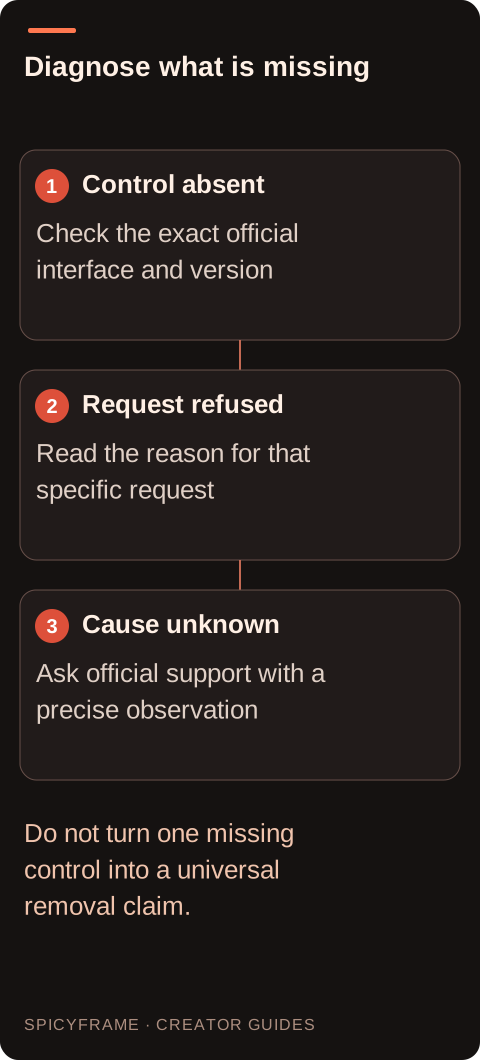
If the creation workflow exists but one prompt is refused, the issue may be content handling rather than a missing style control. Read the displayed reason and use the official appeal or support route where available. For this site, the relevant creative scope is non-explicit adult glamour: authorized eveningwear portraits, fashion movement and cinematic light. Do not seek alternate words, account changes or hidden switches to defeat a restriction. A permitted scene should be genuinely within the service's rules, not a disguised version of a prohibited request. The NSFW-style guide explains the safe creative scope here. A refusal tells you something about that request; it does not prove the entire feature was removed for everyone.
If controls fail to load or the application behaves inconsistently, use normal supported maintenance such as checking connectivity and installing an official app update. Preserve important order or session information before making changes that could remove local state. Do not install an unofficial modified app, share credentials with an unlock service or follow instructions to falsify account eligibility. Those actions do not provide reliable evidence about current access. If the official interface still lacks the option, record that observation accurately and contact support if needed. A clean description of the symptom is more useful than repeated speculative troubleshooting. The absence may remain unresolved until the provider explains the account or product state.
Suppose an adult creator previously followed a tutorial showing a style selector, but the current official app shows an image workflow without that selector. A useful support note would identify the product surface, app version, date, account plan as displayed, and the exact missing control. It would avoid claiming that moderation, geography or payment caused the change unless a notice says so. The creator could also state that the intended project is a non-explicit eveningwear portrait, without attaching private references unnecessarily. This is an example of gathering evidence, not a report of a tested Grok account. It gives support something concrete to investigate and avoids confusing a tutorial mismatch with a confirmed service-wide removal.
If the missing control prevents a permitted project, compare another workflow by its documented deliverable rather than treating it as a way around Grok's rules. SpicyFrame is independent of Grok and supports non-explicit adult glamour video from authorized images or a prompt. It outputs one vertical 9:16 MP4 with ambient sound in 5, 10 or 30 seconds. A five second Medium 480p clip costs $3.99, and a ten second High 720p clip costs $8.99. The Grok alternative guide explains the broader comparison. This is a separate product choice with separate conditions, not a method for restoring a Grok feature or transferring a Grok entitlement.
After checking, your conclusion may be “the option is absent in this official interface for this account today,” rather than “Spicy is gone everywhere.” That narrower statement is more useful and more defensible. If the provider publishes a clear update, revise the conclusion accordingly. Keep old tutorials as historical context rather than current instructions. For a project deadline, decide whether to wait for an official answer, simplify the permitted brief or use a different suitable tool. The Grok image-to-video guide covers the wider workflow. A good availability check ends with a documented next step, even when the provider's public information does not support a universal answer.
| Requirement | Decision | Evidence to check |
|---|---|---|
| Style control is absent | Record surface and version | Current official instructions match that interface |
| One prompt is refused | Read the stated reason | Moderation is not confused with missing access |
| Old tutorial shows another menu | Treat it as historical context | No current entitlement is inferred |
| Purchase page promises a feature | Check the exact account condition | The desired workflow is explicitly included |
| Cause remains unclear | Use official support | Observation is reported without invented explanation |
This guide does not establish that. A missing option on one account or interface is not proof of universal removal; current official notices are the relevant evidence.
It may describe another product surface or an earlier version. Identify the official app or site you use and compare current instructions for that exact workflow.
No. A refused request and an absent control are different observations. Read the reason shown and use permitted next steps or official support rather than assuming one cause.
Only rely on a current official statement that the plan includes the required feature. A historical screenshot or another user's claim does not establish your present entitlement.
Do not rely on modified apps or credential-sharing services. They are not authoritative evidence of access and are not a supported way to resolve an official account question.
Product surface, version, date, the exact symptom and any displayed notice, with private information removed. Describe what you observed without presenting an unverified cause as fact.
External pages, opened in a new tab. Rankings reflect the time of writing.