How long proves that a generation is stuck?
There is no universal time threshold in this guide. Check the actual status and available service information before declaring a failure.
SPICYFRAME · PRACTICAL GUIDES
Check a failed or delayed adult glamour video by separating processing, refusal, payment and download issues, then follow the correct support path.
5 seconds · 480p · $3.99. Pay per video, no subscription required.
Updated

A glamour video that does not appear immediately may still be queued, may be processing, may have been refused, or may have completed with a delivery problem. Record the exact status and error wording before doing anything else. These states are not interchangeable, and the NSFW-style search label does not mean explicit content is supported. Work with authorized images of adults and a permitted, non-explicit fashion brief. If a request is refused, do not disguise the same disallowed request with spelling changes, coded words or another language. First establish what happened to the existing order, then decide whether the appropriate response is waiting, retrieving the result, using support or choosing a different permitted concept.
A payment confirmation and a completed video are different records. Check the order view and the relevant payment record, noting whether you are seeing a confirmed charge, a pending authorization or an unclear state. Do not post full card information or banking screenshots into a support request. If payment appears complete but the studio has no visible order, preserve the receipt reference and the time of purchase. Starting a new generation may create a separate purchase rather than resume the original one. The pay-per-video guide explains the general purchase model; the practical task here is to reconcile the existing order before authorizing another.
Copy the order identifier or save the result page address where available. Record the chosen duration and resolution, because those details help distinguish similar attempts. If the interface offers a safe way to revisit status, use that rather than repeatedly pressing a generation button. Refreshing a page may reveal a newer status, but it is not a command to accelerate remote processing. Be especially careful if you have several tabs open with similar drafts. Keep a short note of which tab belongs to which order. That prevents a completed result from one attempt being mistaken for the delayed result of another and reduces confusion if support needs to trace the sequence.
A lost connection can prevent a status page from updating even while work elsewhere continues. Confirm that the device can reach other pages, then reopen the relevant order view through the supported flow. If you used guest checkout, keep the original access context and any provided receipt or link available. Do not assume an empty library proves that generation failed. Storage preferences can affect what is saved, and a different account or browser context may show different records. The privacy guide explains that storage off prevents library and draft saving while generation still requires processing. These checks identify access issues without inventing a guaranteed recovery mechanism.
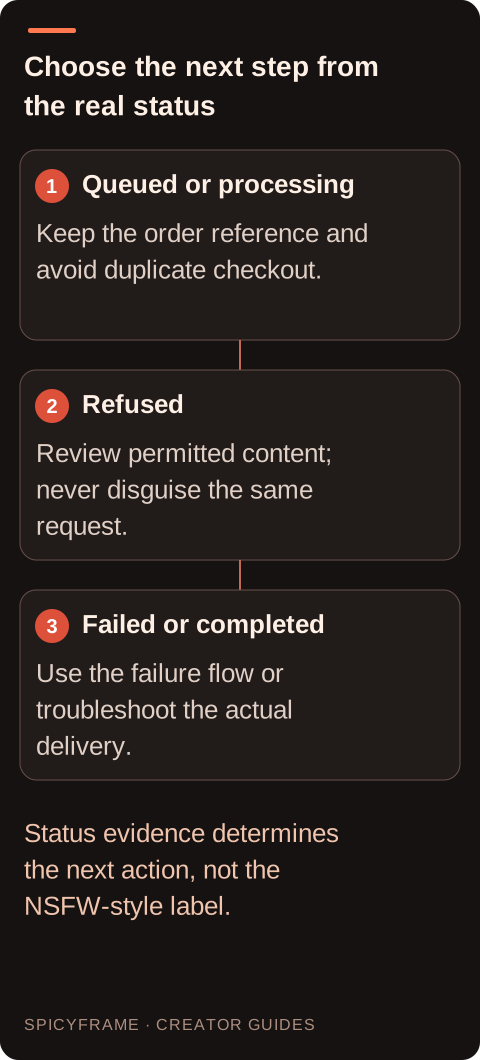
A visible refusal concerns whether the request can be accepted; a processing status concerns work still underway; an explicit generation error concerns a failed operation. Read the message without inventing a reason that the service has not supplied. For a refusal, review the content and image authorization requirements and abandon any disallowed request rather than trying to defeat the decision. A genuinely different, permitted fashion concept can be evaluated on its own terms, with no guarantee it will be accepted. For a technical failure, preserve the order reference and follow the stated recovery flow. For a delay, check current service information and avoid assuming an arbitrary waiting period proves failure.
Imagine a guest purchase for an authorized adult portrait in a formal evening jacket, with a small shoulder turn and quiet room ambience. Payment is confirmed but the result page remains on processing after the phone disconnects. Save the receipt, reconnect and revisit the existing result. If it has completed, inspect that file rather than placing a new order. If it reports a failure, retain the message and follow the failure flow. If it reports a refusal, review the stated content requirements; do not change wording to conceal the same request. This hypothetical example illustrates status decisions and does not claim a tested incident, a fixed processing deadline or a specific hidden moderation reason.
Do not use a second payment as a status check. A new click on a generation or checkout action may start a new job with its own cost, even when the previous tab appears unresponsive. If you already submitted more than once, list each order reference and charge separately rather than assuming they are duplicates in the system. Preserve receipts and timestamps. The goal is to let support identify what actually happened, not to guess from similar thumbnails. SpicyFrame offers guest pay-per-clip purchases and optional weekly plans, but neither model makes repeated generation requests a safe way to recover an existing delayed order. Create a short event record when the order history is confusing. Write the purchase time, the visible status at each check and the moment a download first became available. Include the exact permitted fashion concept in a concise description if support needs context, but do not resend unnecessary private adult photographs or full payment information. If there are two similar eveningwear orders, distinguish them by reference, duration and tier rather than by thumbnail alone. This helps avoid attributing a completed clip to the wrong purchase or treating an older refusal as the status of a newer allowed concept. Keep creative evaluation separate from this record. A changed lapel or an unwanted expression may make the clip unsuitable for the project, yet it does not by itself establish that the generation operation failed. Conversely, a technical failure message deserves the supported failure flow even if the prompt was ordinary adult fashion. Accurate labels make both support and budgeting clearer. Once the issue is resolved, mark the order as completed, failed or otherwise settled instead of leaving several ambiguous browser tabs as the only record of what happened.
Prepare the order reference, purchase time with timezone, selected duration and resolution, current status and exact error text if any. Explain whether payment was confirmed, whether the result page is reachable and what changed after reconnecting or refreshing. Include a relevant screenshot only if it avoids unrelated personal or payment information. The FAQ provides general service context. Confirmed generation failures receive credits or refunds under the applicable flow; a completed clip that is creatively disappointing is a different case. Do not promise yourself a refund solely because the job took longer than expected. Clear evidence helps the service distinguish delay, access trouble, failure and duplicate purchases. Once a result is available, confirm that it belongs to the intended adult fashion order and play the original file completely. Check duration, outfit continuity, authorized likeness and ambient sound before saving the final copy. A downloaded clip with an unappealing pose is still different from a confirmed generation failure. Confirmed failures receive the applicable credits or refunds; dissatisfaction with a completed creative result is not itself that status. Keep the receipt and support record until any payment question is resolved. For future work, record the order identifier at submission and treat each new generation as a separate decision instead of a way to probe a delayed or refused request.
| Observation or goal | Recommended next step | What to verify |
|---|---|---|
| Payment confirmed and status processing | Preserve the order and monitor its status | No new checkout is submitted |
| Spinner remains after connectivity loss | Reconnect and revisit the existing result | The visible status is current |
| Explicit failure message appears | Record it and use the failure flow | Correct order and payment reference |
| Result is complete but download fails | Troubleshoot delivery separately | The original generation is already done |
| Several attempts may have been submitted | List each order and charge | Support can distinguish individual purchases |
There is no universal time threshold in this guide. Check the actual status and available service information before declaring a failure.
A refresh is not a reliable processing control. Preserve the order reference and avoid pressing generation or checkout again while investigating.
No. First reconcile the existing payment and order; a new checkout may create a separate paid generation.
Yes. Payment confirmation and video completion are separate stages, so inspect both records rather than treating them as interchangeable.
Not necessarily. Storage settings, guest access or account context may affect visibility. Check the original result flow and order reference.
The applicable failure flow provides credits or a refund. A slow job or a disliked completed result is not automatically a confirmed failure.