What should a leather-jacket reference show clearly?
Include lapels, seams, cuffs, pockets, closures, and the approved surface finish. A reference that hides these details in darkness makes it harder to preserve the actual jacket during motion.
SPICYFRAME · PRACTICAL GUIDES
Plan adult leather-jacket fashion videos with consistent grain, stable zippers, controlled night reflections and clear street-editorial composition.
5 seconds · 480p · $3.99. Pay per video, no subscription required.
Updated

An AI leather fashion video should preserve the jacket's design while using light and setting to create an adult street-editorial mood. This guide concerns ordinary non-erotic outerwear presentation, with an authorized adult model and a clearly defined garment. Decide whether the important feature is the cut, lapel shape, grain, hardware, or a particular color. A dark city backdrop can be visually effective, but it should not hide the construction you need to show. Begin with a simple movement and a restrained lighting plan rather than adding every neon effect at once. The goal is a jacket that remains the same jacket throughout the clip, not a generic glossy silhouette that changes its seams and closures whenever the camera moves.
Use a sharp reference with readable lapels, shoulder seams, cuffs, pockets, and zipper placement. Leather can have many finishes, so record whether the approved surface is matte, softly polished, textured, or another specific appearance. Do not treat every shiny dark material as equivalent. If the jacket is a real product, use its actual reference rather than a similar style with different hardware. For a real adult model, obtain permission for animation and publication and confirm image rights. The fashion-video guide helps define the garment's role in the campaign. Avoid a source where deep shadow hides half the jacket or where a large accessory covers a signature detail. Motion cannot reliably preserve construction that the reference never makes visible.
A leather surface can show fine grain, broad reflections, creases, and worn areas, but those features should not all move in the same way. Grain belongs to the material; a reflected light changes with the viewpoint and garment angle. In generated video, the two can merge into a crawling glossy texture. Keep the source lighting clear enough that a reviewer can distinguish the surface from the reflection. The lighting guide helps describe one main light and a restrained accent. If the design is matte, do not request a wet or mirror-like shine simply to make the clip look dramatic. An attractive lighting effect can misrepresent the actual jacket finish, which matters when the video is used as a product advertisement.
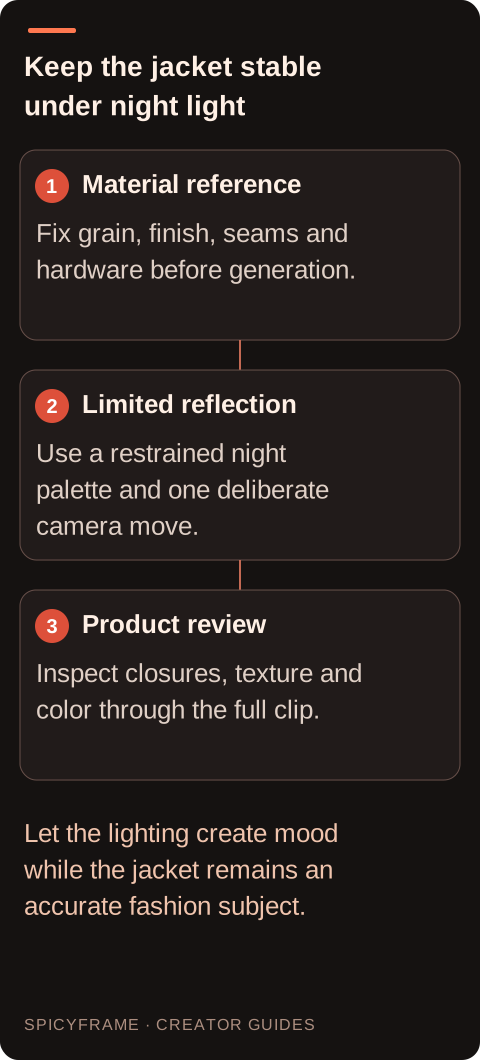
Use a quiet street, simple storefront shapes, or a neutral urban backdrop with a limited color palette. Keep the jacket separated from the background through a soft edge light or a modest difference in tone. Avoid dense moving signs, crowds, and reflective windows in the first test unless they are essential to the brief. Those elements can introduce invented text, duplicate figures, and reflections that compete with the clothing. A night scene does not have to be nearly black; enough detail should remain in the jacket's shadow side to see its cut. If colored light is deliberate, record how much it may alter the apparent garment color. The final reviewer should be able to distinguish a controlled blue reflection from the jacket changing into a different product.
A short walk, a composed quarter-turn, or a slight adjustment of stance can give the jacket life without hiding its details. Keep hands away from key zippers or pockets if those features must be evaluated. A complex action such as repeatedly opening and closing the jacket can introduce large changes in unseen lining and garment geometry. Start with the jacket in its approved position and preserve that state through a simple movement. If a closure demonstration is essential, use a dedicated brief and inspect it as a product action rather than assuming a generic fashion clip proves the mechanism works. The adult subject's pose should remain ordinary street fashion, with attention on the outerwear and scene rather than sexualized body presentation.
A slow lateral track can show the jacket against the city background, while a gentle approach can emphasize lapels and surface texture. Choose one move and avoid combining a rapid orbit with a large subject turn on the first attempt. The camera-motion guide helps describe direction and pace in concrete terms. Keep the camera height and horizon consistent so the jacket's proportions do not appear to stretch. If the scene includes a reflected light, observe how it crosses the garment as the viewpoint changes. A restrained move makes that behavior easier to judge. Add more ambitious motion only after the jacket's grain, seams, and hardware remain coherent in a short controlled test that resembles the final campaign's visual purpose.
Watch the zipper teeth, pull tab, snaps, buckles, pocket edges, and lapel shape through the full clip. Small metallic details can duplicate or disappear, while grain can turn into random noise. Check whether creases remain connected to the elbows and garment folds rather than drifting independently. The artifact guide helps isolate the first moment of a problem. Also inspect reflections in nearby windows and any generated signage so the scene does not imply an unintended brand or location. Review both normal playback and paused frames. If one colored highlight becomes unstable, simplify that light source before changing the entire prompt. A higher-resolution output may expose the error more clearly, but it cannot guarantee stable hardware or physically accurate reflections.
SpicyFrame generates vertical 9:16 MP4 clips with ambient audio through Seedance 2.5 via Segmind. It supports 5, 10, or 30 seconds at Medium 480p, High 720p, or Ultra 1080p and accepts up to 12 authorized JPG, PNG, or WebP references under 10 MB each. There is no 4K output or timeline editor. A five-second High clip costs $4.99, while ten seconds costs $8.99; choose based on the planned action and edit. Verify any claim about material composition, durability, waterproofing, or product performance separately from the generated appearance. Have the brand approve the jacket design and the adult model approve the use of their likeness. Add accurate titles and licensed music in an appropriate editor, and keep the final approved version connected to the original product and permission records.
| Element | Reference decision | Playback review |
|---|---|---|
| Surface finish | Matte, polished or textured appearance fixed | No unintended wet or metallic transformation |
| Hardware | Exact zipper, snap and buckle positions | No missing or duplicated components |
| Seams and lapels | Clear construction against the background | Stable cut and edge geometry |
| Night light | Limited palette with readable shadow detail | Reflections do not replace the jacket color |
| Street context | Simple approved setting | No misleading signs, reflections or background figures |
Include lapels, seams, cuffs, pockets, closures, and the approved surface finish. A reference that hides these details in darkness makes it harder to preserve the actual jacket during motion.
No. Excessive shine can turn matte leather into a different-looking material. Match reflections to the real finish and keep lighting effects separate from product characteristics.
Use a short walk, small quarter-turn, or composed stance change while the jacket remains in its approved position. Complex closure actions require a more specific product-motion review.
Zippers, snaps, buckles, and pull tabs can duplicate, disappear, or shift. Track their placement across the whole clip instead of approving only the opening frame.
No. Synthetic appearance is not a performance test. Use actual product evidence for durability, weather resistance, material composition, or any other functional claim in the campaign.
Simplify the background and lighting when they are not essential. Review generated signs, reflections, and people so they do not introduce unintended brands, locations, or misleading context.