What is the main challenge in animating satin?
Its moving highlights can flicker or detach from the folds. A useful test checks whether reflections change coherently with the garment, camera, and light rather than judging only one attractive frame.
SPICYFRAME · PRACTICAL GUIDES
Create adult satin-fashion videos with controlled highlights, readable drape, stable color and restrained movement that keeps the garment coherent.
5 seconds · 480p · $3.99. Pay per video, no subscription required.
Updated

An AI satin fashion video depends on how light moves across the garment as much as on the garment's outline. Satin is associated with a smooth, lustrous surface, so broad highlights and soft folds can define its appearance. In generated motion, those same features can flicker, slide independently, or resemble a different material. This guide focuses on non-erotic adult fashion: an opaque satin dress, blouse, skirt, or jacket presented in an ordinary editorial setting. Start with the specific garment and the visual property you need to communicate. Do not use shiny as a substitute for a fabric brief. A useful reference shows where the material catches light, where it falls into shadow, and how the folds connect to the garment's construction.
Look for a photograph where the satin's bright areas retain some shape and the dark areas still reveal seams and folds. A blown-out stripe of light can hide the fabric edge, while an almost black shadow can make a sleeve disappear. Avoid references with contradictory light directions or heavy filters that turn every surface glossy. For a real adult model, confirm permission for animation and publication along with image rights. A fictional adult fashion character should still have plausible clothing construction and opaque coverage. The lighting guide helps describe source direction and softness. If the starting image already has unstable-looking highlights or indistinct folds, correct it before generation rather than asking motion to solve the material and the pose at the same time.
A satin garment can appear lighter, darker, or slightly different in hue depending on the illumination and viewing angle. Decide which color is the approved product color and which variations are reflections. Keep the background and light palette restrained if accurate color is important. A red or blue accent light may create an attractive editorial effect but can make it difficult to judge the original fabric. If the clip represents merchandise, compare it with an accurate product reference and avoid promising precise color reproduction across every viewer's screen. The fashion workflow guide connects styling choices with commercial review. Record any deliberate color treatment in the brief so the reviewer can distinguish an intended lighting effect from an unexplained garment-color change during motion.
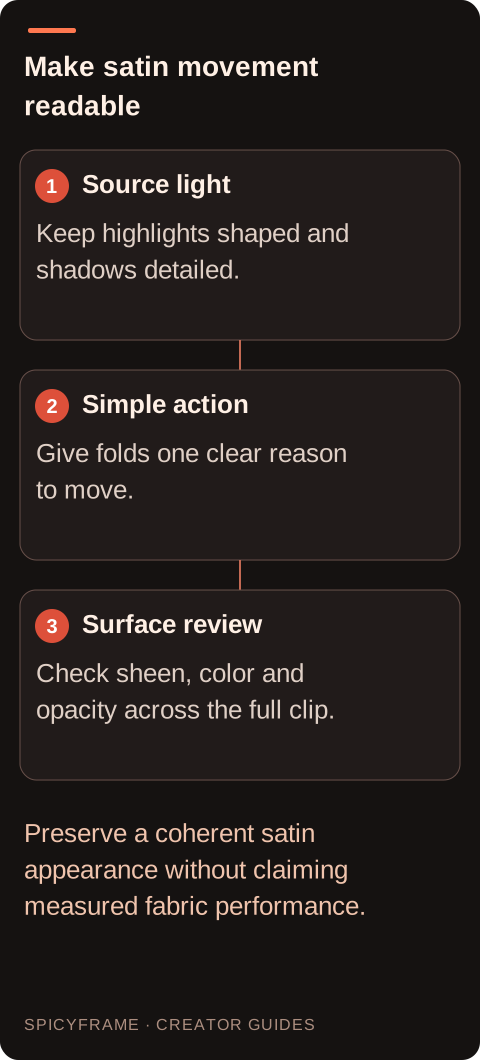
Choose a movement that gives the fabric one clear reason to change: a small turn, a gentle step, or a sleeve moving with a modest arm adjustment. The folds should remain connected to seams, the waist, or other visible support points. Avoid asking the satin to billow dramatically while the subject and environment stay still. That combination can create motion with no understandable cause. Keep the action nonsexual and clothing-focused. A small movement can communicate softness without requiring exaggerated fabric simulation. If the source shows only the front of a blouse, do not start with a full rotation that demands an invented back. Build confidence with a limited action before expanding the shot. Synthetic drape is a visual interpretation, not a measured demonstration of the real fabric's weight or handling.
A slow lateral move or modest approach can reveal satin's changing highlights, but a fast orbit can turn them into distracting flashes. Choose one camera action and keep the lighting direction stable. The camera-movement guide helps distinguish camera motion from subject motion when writing the brief. For the first test, let either the model's small turn or the camera move carry the shot, then judge how the highlight responds. Avoid combining a spinning subject, moving light, and rapid camera rotation unless the project can tolerate substantial visual invention. A restrained composition makes it easier to see whether the material remains satin or shifts toward metallic, plastic, or wet-looking textures that were never part of the approved garment.
Watch a distinctive bright fold from the beginning through the end of the clip. It should change in a way that relates to the garment's movement and the light direction, rather than popping into unrelated positions. Check whether seams disappear inside glare, shadows open into accidental transparency, or the surface becomes uniformly mirror-like. Compare the garment's matte details, such as trim or lining, with the satin areas so the whole outfit does not acquire the same finish. Review at normal speed and in paused frames. A single beautiful still is not enough if the highlights crawl during playback. When a problem appears, simplify the lighting or movement and improve the source evidence instead of assuming that stronger words about realism will reliably repair the material.
SpicyFrame offers Medium 480p, High 720p, and Ultra 1080p outputs for vertical 9:16 MP4 clips with ambient audio. It uses Seedance 2.5 through Segmind and supports 5-, 10-, and 30-second durations. Satin's fine highlight transitions may be easier to inspect at a suitable viewing resolution, but more pixels do not guarantee correct texture or motion. The 480p and 720p guide helps distinguish a draft check from a delivery requirement. A five-second High clip costs $4.99; ten seconds at High costs $8.99. A new generation can vary from an earlier draft, and there is no exposed seed control. Review the final-quality result independently rather than assuming it reproduces every fold from a lower-resolution attempt.
Before publication, have the adult model or authorized creative lead approve the pose and have the brand approve the garment representation where relevant. Confirm that the fabric stays opaque, the color treatment is intentional, and the silhouette remains the same item. Use accurate editorial text for composition or care claims; the video cannot establish fiber content, quality, or performance by appearance alone. SpicyFrame accepts up to 12 authorized JPG, PNG, or WebP references under 10 MB each and has no timeline editor or 4K option. Add any titles, licensed soundtrack, or sequence assembly elsewhere. Keep the source and final approval together. The strongest satin clip makes its sheen and movement readable while remaining clear about what is an attractive generated interpretation and what is a verified product fact.
| Visual element | Prepare in the source | Inspect during playback |
|---|---|---|
| Highlights | Bright areas with readable shape | No popping or independent sliding |
| Folds | Clear connections to seams and support points | Motion follows the garment action |
| Color | Approved base color under controlled light | No unexplained hue substitutions |
| Opacity | Lined or otherwise opaque styling | Shadows do not become transparent gaps |
| Finish contrast | Distinct satin, trim and lining | Entire outfit does not turn uniformly metallic |
Its moving highlights can flicker or detach from the folds. A useful test checks whether reflections change coherently with the garment, camera, and light rather than judging only one attractive frame.
Use controlled highlights that retain shape. Large blown-out areas can hide seams and edges, while deep shadows can obscure construction and make later movement harder to evaluate.
Yes. Reflections can alter the apparent hue. Keep the lighting palette restrained when product color matters and record any deliberate color treatment for the final review.
A small turn, gentle step, or modest sleeve movement provides a clear reason for folds to change. Avoid dramatic billowing without a corresponding action or environmental cause.
No. Appearance alone does not verify fiber content, construction, quality, or performance. Use accurate product information and treat the generated surface as a visual interpretation.
Not necessarily. Resolution changes output detail, not a guarantee of coherent material behavior. Improve the source or simplify light and motion, then inspect the new final output independently.