What is Grok's current daily video quota?
This guide does not establish a universal consumer quota. Use the current official account display or support information, including the unit being counted and any plan conditions.
SPICYFRAME · PRACTICAL GUIDES
Understand Grok video limits by separating clip length, generation allowance, queue time and reset notices, then plan a non-explicit adult glamour project.
5 seconds · 480p · $3.99. Pay per video, no subscription required.
Updated

“Grok video limit” may mean the length of one clip, the number of requests an account can make, a temporary capacity restriction, the size of an input or the time a download remains available. Those are different constraints and need different responses. The official X Help page reviewed for this guide does not specify a current consumer Spicy video duration or universal generation quota. This article therefore does not invent a daily number or reset time. The broader Grok spicy guide supplies context. Begin by copying the exact limit message privately and identifying which quantity it describes before changing the project or considering a purchase.
Clip duration is the length of the delivered scene. Processing time is how long the service takes to produce it. A short output does not imply an equally short wait, and a slow render does not necessarily mean the requested duration exceeds a limit. Look for the actual status shown by the official workflow. If it is still processing, avoid submitting duplicate requests simply because the wait feels long. If an explicit duration restriction appears, adjust the intended shot within the supported options. The video duration guide explains how to choose a scene length according to action. This distinction is particularly useful for a restrained adult glamour portrait whose movement may be complete in a short shot.
A displayed allowance may count requests, completed outputs, credits or another unit. Do not assume that one request always produces one downloadable video or that images and videos draw from the same pool. Read current official wording and note any condition attached to the account or plan. If the interface shows a remaining quantity, record the unit alongside the number. A bare number copied into a tutorial is not a useful entitlement description. The Grok image-to-video guide explains the broader workflow, but current consumer limits must come from the relevant official interface. Developer API rate limits are a different context and should not be repurposed as a consumer daily quota.
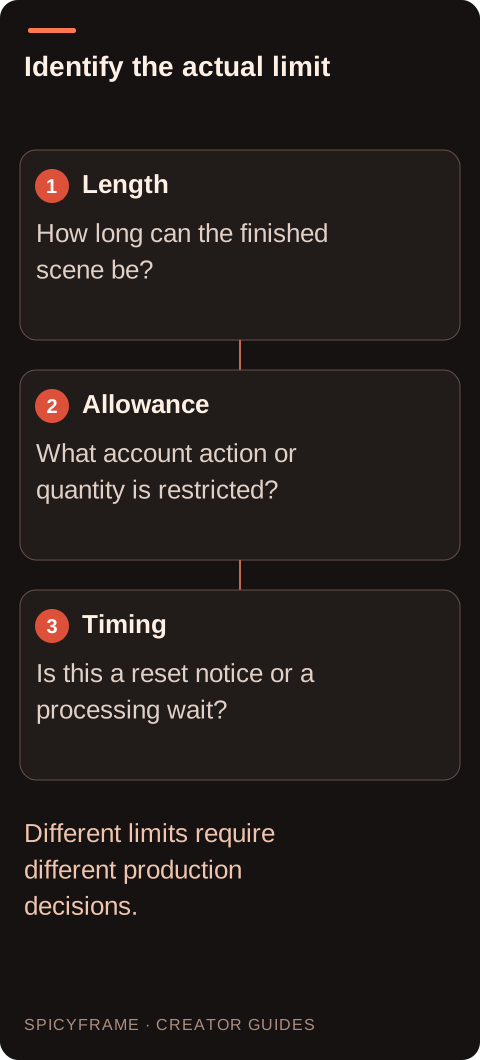
If a reset time is displayed, check the timezone and whether the statement describes a fixed period or a rolling interval. If no reset rule is given, do not assume access returns at midnight, after twenty four hours or after signing out. A temporary capacity notice is also not automatically a personal quota reset. Use official support when the timing affects a deadline and the notice is unclear. Keep the conclusion narrow: “the account shows this message now” is more accurate than claiming a universal schedule. This guide provides a method for interpreting available evidence, not a hidden formula for restoring usage or a workaround for the service's limits.
A short non-explicit adult fashion clip should have a readable action rather than a compressed list of events. One gentle gaze shift, a small change of posture or a restrained movement in a long coat may fit a brief shot better than a walk, turn and camera orbit combined. If the available duration is shorter than the original concept, simplify the action instead of demanding that every event happen unnaturally fast. The fashion video guide helps prioritize garment continuity. If a longer edited sequence is required, plan distinct assets and external editing, while recognizing that separate generations do not automatically maintain exact identity, lighting or movement continuity between shots.
Suppose an adult creator needs three distinct eveningwear shots, but the current official interface displays a limit notice whose reset timing is unclear. A useful plan is to identify whether the notice concerns account allowance or temporary capacity, then obtain an official answer before promising a delivery time. Meanwhile, the creator can prepare the authorized sources and write three bounded shot briefs without submitting more requests. This is a hypothetical production plan, not a report of Grok testing. If the deadline cannot tolerate uncertainty, the creator may compare another documented workflow for the permitted concept. The decision should reflect actual availability and cost rather than a guessed reset rule from an old forum post.
SpicyFrame is independent of Grok and offers 5, 10 or 30 second non-explicit adult glamour clips. It delivers one vertical 9:16 MP4 with ambient sound at Medium 480p, High 720p or Ultra 1080p. A ten second clip costs $4.99, $8.99 or $23.99 respectively. These are SpicyFrame choices, not evidence of Grok's duration or allowance. If your concept needs precise shot assembly, external editing remains separate. The generation time guide explains why output length and waiting time should not be conflated. A paid alternative can make some production choices explicit without guaranteeing instant rendering, exact likeness or a successful creative result on the first attempt.
Record the desired deliverable, current official limit message, account context and any stated reset or support answer. Track paid orders separately from creative variations so a pending job is not accidentally replaced by another purchase. When a limit blocks work, use the documented next step rather than seeking multiple accounts or other ways to evade it. Review completed clips against the intended adult glamour brief and save permitted downloads promptly. A useful limit plan has three parts: what is known, what remains uncertain and what action can proceed without that uncertainty. That is enough to manage a small production responsibly even when the provider does not publish a stable universal quota table.
| Requirement | Decision | Evidence to check |
|---|---|---|
| Message concerns clip length | Adjust the shot duration or action | Supported output options are verified |
| Message concerns allowance | Identify the counted unit | Requests, outputs and credits are not conflated |
| Job is still processing | Follow the existing status | No duplicate order is created casually |
| Reset timing is absent | Use official support if needed | No universal schedule is invented |
| Campaign needs several shots | Plan separate assets and external editing | Continuity and cost are considered explicitly |
This guide does not establish a universal consumer quota. Use the current official account display or support information, including the unit being counted and any plan conditions.
No. Output duration and processing time are different quantities. Follow the actual status of the existing job rather than assuming the clip length predicts completion time.
Use an explicit official reset notice if one is shown. Do not assume midnight or a twenty four hour interval when the consumer workflow does not document it.
Not reliably. Developer API limits and consumer-app entitlements are different contexts. Use information that explicitly applies to the account and workflow you are using.
Simplify the action or plan separate assets for external editing. Do not expect a short shot to preserve several complex movements merely by compressing them into less time.
No such inference is justified. Those are SpicyFrame's documented output choices and should remain separate from any current Grok consumer duration or quota information.
External pages, opened in a new tab. Rankings reflect the time of writing.