Does SpicyFrame include an AI photo editor?
It provides video generation from references or a prompt, not a dedicated retouching workspace. Prepare precise crops, color changes and cleanup in an external image editor.
SPICYFRAME · PRACTICAL GUIDES
Prepare an authorized adult glamour photo for animation with careful crops, color and cleanup, while separating photo edits from generated video movement.
5 seconds · 480p · $3.99. Pay per video, no subscription required.
Updated

An NSFW AI photo editor search can mix ordinary glamour retouching with very different requests. This guide covers non-explicit preparation of authorized adult fashion photographs: cropping, tonal adjustments, background cleanup and the removal of distracting interface elements. It does not cover changing a person's clothing to expose them or inventing intimate imagery. Write the intended edit in practical terms, such as “preserve the evening dress, remove an empty border and soften the background brightness.” That makes the desired change reviewable. SpicyFrame animates references; it does not provide a built-in photo editor, masking workspace or precise retouching controls. Prepare the still externally when a particular pixel-level change matters to the final result.
Keep the source photograph intact and create a separate working copy. This allows you to compare skin texture, garment seams and color after each meaningful adjustment. A glamour look can be polished without erasing the person's identity or changing the design being shown. Avoid a chain of repeated compressed exports; make the main edits from the best source and export once for upload. If a phone image is HEIC, convert it externally to JPG, PNG or WebP rather than renaming the extension. The reference quality guide explains why a clear, consistent input matters more than an aggressively sharpened image that introduces halos or invented facial detail.
A tight portrait crop may work as a photo but leave no room for a small turn or moving sleeve. SpicyFrame delivers vertical 9:16 video, so review a portrait composition before upload. Keep meaningful hands, shoulders and garment edges inside the frame, with space in the direction of motion. Do not stretch a landscape photo into vertical proportions; that changes the face and outfit before animation begins. If the important subject and context cannot fit together, choose another image or prepare a deliberate padded composition externally. The vertical video guide helps distinguish a framing decision from a generation problem. The model cannot faithfully preserve content that the crop has already discarded.
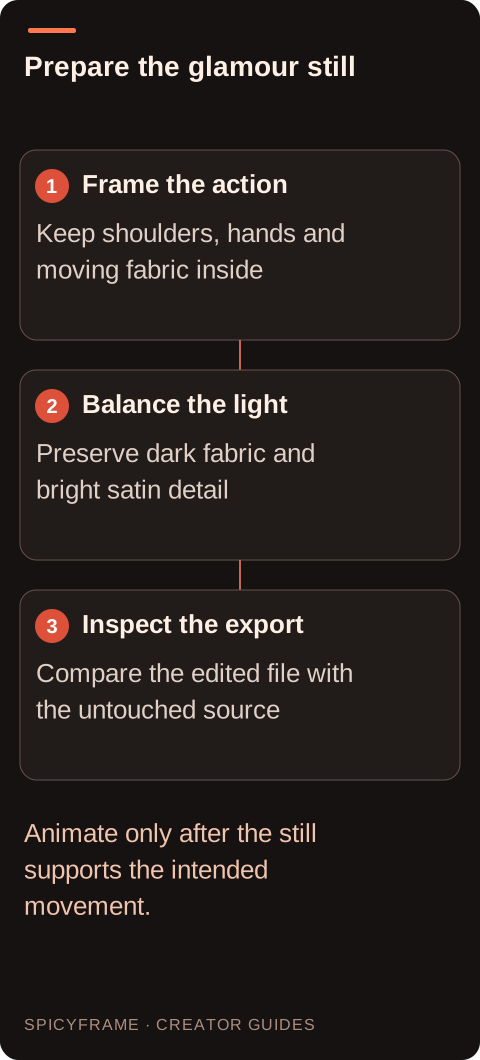
Eveningwear often includes dark fabrics, glossy surfaces and bright jewelry. A contrast adjustment that makes the image dramatic can also merge lapels into a black mass or clip highlights on satin. Inspect the areas the clip must preserve. If the outfit is the subject, its silhouette and construction need to remain readable. Use external tonal edits to balance those details rather than asking the video prompt to relight the entire scene and preserve every original shadow simultaneously. A strong red or violet atmosphere can be part of adult glamour, but color should support the face and clothes. The lighting prompt guide helps describe a stable lighting setup after the still has been prepared.
Removing a border or dust mark on an empty wall is different from removing a caption that covers an eye or garment fastening. The latter requires invention because the covered pixels contain no visible evidence of what was behind them. Prefer another source when the hidden region is important. If you make a substantial external reconstruction, inspect it carefully and do not treat it as an authentic recovery. The same applies to AI enlargement that adds plausible pores, lace patterns or jewelry. Those additions may look convincing but become new reference content during animation. A useful preparation workflow improves readability while keeping the boundary between preserved information and newly invented detail clear.
Suppose an authorized adult portrait shows a tailored black suit under red club lighting, with a bright exit sign at the edge and a little unused space below the frame. The plan could be to crop away the sign, lift the darkest suit tones slightly and keep the red light direction unchanged. The motion brief would then ask for one subtle shift of gaze with a still camera. This is a proposed process, not a tested output. It separates a controllable still edit from the later creative motion. If the crop would remove a hand or shoulder, keep the wider composition or choose another source instead of forcing the frame to satisfy every preference at once.
SpicyFrame accepts up to 12 authorized JPG, PNG or WebP images under 10 MB each. Choose a format based on the image, not on an assumption that a larger file is always better. A high quality JPG is often practical for photography; PNG can preserve a lossless working result but may be larger. Open the exported derivative in a normal viewer and check orientation, color, crop and any repaired edges. Ensure the selected file is the edited version rather than a similarly named original or preview. If using several references, keep clothing and appearance consistent. The multiple reference guide explains how a small coherent set can be more useful than many contradictory images.
When a clip looks wrong, compare it with the exact uploaded derivative. If the face was already smoothed beyond recognition, revisit the still edit. If the garment was clear at the start but its seams change during movement, simplify the action or choose a stronger reference. Do not keep increasing contrast to fix temporal drift. Similarly, a beautiful retouched still does not guarantee a faithful moving face. Review the full sequence at normal speed and pause on important clothing details. Keep notes on what changed at each stage so the next revision addresses one cause. External editing offers precise preparation; generation supplies interpreted movement. Understanding that division makes the workflow more predictable without promising exact preservation.
| Requirement | Decision | Evidence to check |
|---|---|---|
| Distracting empty border | Crop externally | Planned movement still has room |
| Dark eveningwear loses seams | Adjust tone carefully | Construction remains readable |
| Caption covers an eye | Find an unobstructed source | Identity is not reconstructed from a guess |
| HEIC phone original | Export a supported still externally | File opens and stays under 10 MB |
| Moving video changes a clear seam | Revise motion or reference choice | Do not confuse drift with still retouching |
It provides video generation from references or a prompt, not a dedicated retouching workspace. Prepare precise crops, color changes and cleanup in an external image editor.
Use authorized adult photographs and focus on framing, light, background distractions and image quality while preserving the intended clothing and identity. Keep the content non-explicit.
It cannot recover verified content that was removed. Leave room for the planned movement before upload and choose another source if the important elements cannot fit together.
Avoid removing facial structure or useful texture. Compare the derivative with the original at normal viewing size so a polished finish does not become an altered identity.
Seek a clean source when the hidden design matters. Removing an opaque overlay requires inventing the covered region, which is different from recovering authentic garment detail.
It lets you change the crop or tonal choices later without repeatedly processing a compressed derivative, and helps distinguish source changes from artifacts introduced by motion generation.