Does a clothing description lock the outfit in place?
No. It expresses the intended garment, but the generated clip must still be checked for changing seams, patterns and coverage.
SPICYFRAME · PRACTICAL GUIDES
Check adult glamour AI clothing consistency through collars, seams, patterns and movement, then revise the source or pose while keeping outfits intact.
5 seconds · 480p · $3.99. Pay per video, no subscription required.
Updated

Clothing consistency in adult glamour AI video means the approved outfit remains recognizable and intact throughout the permitted, non-explicit scene. Inspect collar shape, sleeve length, seams, buttons, pattern placement and the visible hem. A changing highlight on satin is different from a lapel disappearing or a jacket becoming another garment. Write the details that matter before reviewing the clip, especially if it represents a real fashion item. Use authorized adult references and keep the original clothing coverage and styling within the approved brief. This guide concerns preserving garments, not removing them or creating exposure. The fashion video guide provides broader styling context; the specific task here is checking continuity as the adult model moves.
Watch the whole sequence normally, then pause around a shoulder turn, hand movement or step. Compare the outfit immediately before and after the action. Does a cuff change length when the hand passes? Does a row of buttons gain another button? Does a patterned panel shift independently of the body? Record the first affected moment so the next revision targets a visible problem. A folded sleeve can naturally change its outline, so do not mistake every moving edge for a defect. Look for changes that cannot be explained by the intended view or fabric movement. The artifact guide helps separate local clothing changes from broader body or background distortions happening at the same time.
Dark fabric against a dark backdrop can hide the boundary of a sleeve. Reflective trim may disappear into a bright highlight. Small repeating patterns may already be unclear before generation begins. Choose a source that shows the relevant garment area with enough contrast and focus to understand its construction. A closer image of a lapel can support a detail-focused shot, while a full-length outfit needs a wider view with intact hems and footwear where relevant. The photo guide explains general preparation. Avoid painting invented seams onto a weak source simply to make them look clearer. If exact product construction matters, use an approved photograph that actually shows the feature rather than asking the model to infer it.
Multiple images can clarify the same outfit, but they can also show different versions without the difference being obvious at thumbnail size. Compare buttons, sleeve cuts, belt position, jewelry and fabric color across the set. Explain which image defines the adult identity and which defines the garment. Remove references with conflicting jackets or accessory arrangements unless the project truly needs distinct scenes. The multiple-reference guide provides a role-based approach. SpicyFrame accepts up to 12 authorized JPG, PNG or WebP files under 10 MB each, but using more images does not establish a garment lock. Consistent evidence is more useful than a large set that silently asks for incompatible clothing details.
A large turn can reveal the back of a jacket that the source never shows. Crossed arms can hide the front closure, and a moving clutch can repeatedly cover a seam. If continuity fails around one of these events, simplify that event while preserving the fashion purpose. A smaller shoulder turn or a stable accessory hold may let the same outfit read clearly. A permitted direction can say that the approved jacket remains fully worn with its collar and cuffs visible, but text alone does not enforce exact construction. SpicyFrame has no built-in garment mask or local repair control. Inspect the next result rather than assuming a positive constraint guarantees every seam will remain unchanged.
Imagine an authorized adult portrait in a pinstriped suit with a single row of buttons. During a generated turn, the stripe spacing changes and an extra button appears near the waist. First compare the source: are the original stripes and closure clearly visible, or are they compressed into fine marks? If the source is clear, test a smaller turn with the hands and clutch kept away from the closure. If the source is unclear, choose a better approved photograph before retrying. This hypothetical process is not a tested repair. If exact pinstripe alignment is central to a commercial garment presentation, a conventional detail shot may be preferable to accepting an attractive but inaccurate generated pattern.
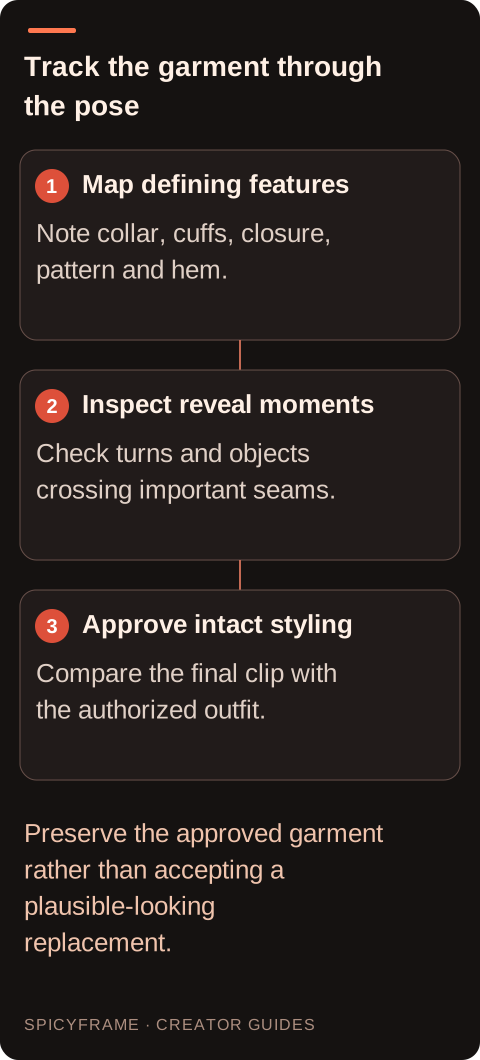
A separate editor can trim away a flawed ending or cut to an approved detail view, provided the remaining sequence still communicates the intended outfit. A local visual repair may affect neighboring fabric or motion, so inspect the full repaired passage rather than one still. SpicyFrame has no built-in timeline, masking brush or clothing replacement editor. Do not hide a changed garment feature if the video is meant to demonstrate a real product accurately. For an illustrative mood piece, a small imperfection may be acceptable after review, but the depicted adult's approved appearance still matters. Keep the original download and record what the edit changed so future variants do not accidentally reintroduce the continuity defect. Build a garment map from the source before evaluating a complex outfit. Record a small number of defining landmarks: the lapel notch, the closure line, one distinctive cuff and the hem. For patterned clothing, choose a recognizable crossing of stripes or a motif near a seam rather than trying to track every tiny mark. Follow those landmarks through the action and note whether they disappear through normal occlusion or return in a different place. This makes a review more reliable than a broad impression that the clothes seem to change. When several layers overlap, such as a coat over a jacket, identify which edge belongs to which layer. A generated fold can otherwise be mistaken for a new garment opening. Review reflections separately on glossy materials, since a moving bright area does not necessarily move the seam beneath it. Keep the checklist short enough to use on every candidate. If the important landmarks cannot be identified in the original image, the source may be unsuitable for a clip whose purpose is accurate garment presentation, even if it remains useful for an atmospheric portrait.
Review the face and clothing together, because a stable jacket with an altered person still fails an identity-focused fashion brief. Check the opening, largest pose change and ending, then compare early and late garment features for gradual drift. Inspect dark cuffs, bright satin edges, buttons and jewelry at the actual delivery size. After any external export, confirm that compression has not turned a previously readable pattern into distracting shimmer. Establish a clear stopping rule: the approved silhouette, coverage and defining construction details stay intact through the required action. If repeated attempts cannot meet that standard, simplify the movement, choose a clearer reference or use conventional footage for the exact garment information instead of accepting an unsupported representation.
| Situation | Action | Verify |
|---|---|---|
| Collar changes during a shoulder turn | Reduce the turn or improve the angle reference | Same collar structure before and after |
| Dark cuff merges with the backdrop | Choose clearer contrast in the source | Sleeve and hand boundaries stay readable |
| Stripes crawl inside a stable outline | Reassess pattern detail and movement | The pattern remains coherent in motion |
| References show different jackets | Assign roles or remove conflicting images | One approved outfit defines the scene |
| Exact garment construction is essential | Compare against approved product material | No invented seams, buttons or coverage changes |
No. It expresses the intended garment, but the generated clip must still be checked for changing seams, patterns and coverage.
Not necessarily. Reflections can change with movement. Look for altered garment boundaries or construction rather than brightness alone.
Use separate scenes for distinct styling when needed. Conflicting garments in one reference set can make the intended outfit unclear.
There is no built-in garment mask or local repair editor. Any selective repair is an external process that needs review.
Check source clarity and the action around the change, then simplify or replace the shot when accurate product details matter.
No. The goal is preserving approved, intact clothing in authorized, non-explicit adult fashion imagery.