NSFW-style AI uploads: storage and deletion choices
Understand storage and deletion for non-explicit adult glamour uploads, with temporary access, private libraries, provider processing and saved copies.
5 seconds · 480p · $3.99. Pay per video, no subscription required.
Updated
AI-generated editorial illustration: an adult fashion look in red city light. This is a styling reference, not a video-generation result.
Separate storage choices from the act of processing
NSFW-style AI upload privacy begins with understanding which copy you are controlling. In this guide, the creative context is non-explicit adult glamour or fashion, not pornography. A source photograph may exist on your device, in a browser draft, in the studio's private library and in a generation provider's processing systems. A finished video may also be downloaded or shared elsewhere. Turning off one storage option does not make every other copy disappear. Before uploading, decide whether the project needs a saved library or only temporary delivery. Use the minimum authorized reference set that serves the scene. Do not upload private information unrelated to the fashion brief, such as identity documents, home addresses or another person's confidential messages visible in a background.
Understand what the studio's storage option controls
The reviewed studio implementation and privacy terms distinguish new library saves from generation processing. The “Keep my new photos and video” option controls new library saves and browser drafts. Turning it off clears the current browser draft but does not delete files already saved to the account. Guest orders do not archive media to a private library. Those are concrete storage controls, not a promise of anonymous or zero-retention generation. Images and prompts still need to be processed to fulfill the request. If you previously saved an authorized glamour portrait, revisit the library or deletion controls separately instead of assuming a later toggle removes that earlier file. Check the displayed option before each new project, especially on a shared device or when changing from an account workflow to a guest order.
Plan for temporary result access before generating
For completed temporary orders, the current implementation sets result access to expire 24 hours after completion. It clears prompts and reference URLs on completion, and expired order media links are cleared during subsequent order requests. This describes the studio's access and cleanup behavior; it is not a guarantee that every provider copy is physically erased at the same instant. Download an approved result within the available access period if you intend to keep it, and store it according to the subject's permission. Avoid relying on a temporary link as a permanent portfolio or delivery URL. The privacy guide gives wider context, while the actual order screen remains the place to check the current delivery state and any displayed expiration information.
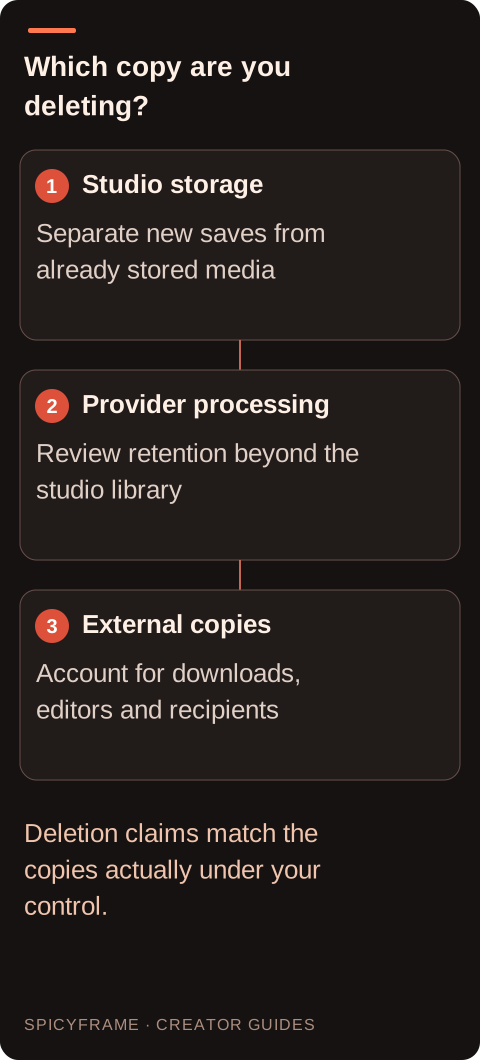
Studio storage: Separate new saves from already stored media. Provider processing: Review retention beyond the studio library. External copies: Account for downloads, editors and recipients. Deletion claims match the copies actually under your control.
Use media deletion for media, not for subscription management
The “Delete all my media” control removes the studio's uploaded images, saved videos and prompts while keeping the account and piments. Current renders must be resolved before deletion can proceed. The implementation also handles unpaid checkouts so an open purchase does not silently create a new result after the cleanup. Download only the files you are authorized to retain before confirming deletion, because the removed library media cannot simply be recovered through the same control. Media deletion is not the same as cancelling a recurring plan, requesting a refund or withdrawing consent from an outside publisher. If your goal includes stopping future billing, review the billing controls separately rather than assuming that an empty library changes the subscription.
Understand the additional scope of account deletion
The account-deletion flow includes verification and explicit permanent-deletion confirmation. The current terms describe removal of the studio profile, private media and authentication account, cancellation of an active subscription, revocation of prior studio sessions and removal of unused piments, subject to applicable statutory rights. The implementation resolves ongoing work before completing deletion. Treat this as a broader action than removing a single reference or video. Check whether you need receipts, approved masters or support information first, without retaining another person's material beyond the agreed scope. Account deletion does not automatically recall downloads or erase copies published to social platforms. It also does not eliminate every billing or authorization record that must remain for legal obligations, security or claims.
Account for provider processing and necessary records
The legal page identifies Segmind as the generation processor, Stripe for checkout and billing, and Lovable/Supabase for authentication. It states that providers may process data outside your country and does not promise that all processing remains in the EU. The studio storage option does not control the generation provider's independent retention process. Necessary payment references, consent declarations and limited security records may remain after media deletion. A recorded rights checkbox is evidence of the user's declaration, not independent verification that another adult consented. Do not describe the workflow as untraceable, anonymous or instantly erased everywhere. If provider retention or jurisdiction matters to the project, check the current applicable terms before uploading a sensitive authorized portrait, rather than treating deletion as a substitute for that decision.
Map the copies outside the studio as well
A hypothetical photographer may download a final fashion clip, send a review copy to the adult model and place an approved version in a portfolio. Deleting the studio library affects none of those external copies automatically. Keep a simple asset list showing where the source, master and review derivatives were delivered. Agree in advance whether collaborators may retain rejected drafts and how they should handle a later removal request. Use the sharing guide as background, but make the actual agreement specific to the people and channels involved. Check cloud-sync folders, external editing projects and messaging attachments when carrying out your own authorized cleanup. Do not promise the subject a total recall that you cannot technically or contractually deliver.
Confirm the outcome and preserve only necessary evidence
After using the intended deletion control, inspect the account or library state and keep any confirmation needed for your records. If the operation is blocked by an unresolved render, resolve that order through the normal status or support path rather than starting another deletion attempt blindly. A support request should identify the relevant order without including unnecessary sensitive imagery. Keep billing evidence separately from creative media where practical, and do not delete material needed to understand an unresolved payment issue before recording the essential references. The pay-as-you-go guide explains the one-off purchase alternative, while the source photo guide helps reduce unnecessary uploads at the beginning. Good deletion planning starts with a clear inventory of what was saved, processed, downloaded and shared.
NSFW-style AI uploads: storage and deletion choices: review decisions
Decision
Practical action
Approval evidence
New storage
Review the save option before upload
Existing media is handled separately
Temporary result
Download an authorized keeper within access time
No permanent-hosting assumption
Media deletion
Resolve current renders first
Library removal keeps account and piments
Account deletion
Review billing and unused balance consequences
Explicit permanent-deletion confirmation
External copies
List downloads and shared derivatives
Recipients follow the agreed retention scope
AI image-to-video questions answered
Does turning storage off delete my earlier uploads?
No. The option controls new library saves and the current browser draft. Existing account media needs the relevant deletion control; provider processing and necessary payment records are separate considerations.
How long can I access a temporary completed result?
The reviewed implementation sets temporary result access to expire 24 hours after completion. Check the actual order display and download authorized keepers promptly; this is not a promise of synchronized erasure across providers.
Does deleting all media cancel my weekly plan?
No. Media deletion keeps the account and piments and is separate from subscription management. Use the billing controls if your goal is to stop future renewal, and confirm the resulting subscription status.
Will deleting my account erase every payment record?
Not necessarily. The terms allow necessary billing, authorization and minimal security records to remain for applicable obligations or claims. Account deletion is not a promise that every operational trace disappears.
Can I delete media while a render is still running?
Current renders must be resolved first. Follow the order's status or support process so deletion does not race with an active generation or an unsettled payment, and avoid paying again unnecessarily.
Can the studio recall a video I already sent to someone?
No. Downloads and published copies are outside the library deletion control. Agree on retention and removal with recipients, and avoid promising complete recall when copies may exist elsewhere.
Sources
External pages, opened in a new tab. Rankings reflect the time of writing.