Does MP4 guarantee that every iPhone app will play the file?
No. The container name alone does not establish compatibility with every player, editor, device or installed software version.
SPICYFRAME · PRACTICAL GUIDES
Create permitted adult glamour AI video on iPhone, prepare supported photos, track the browser order and verify the saved MP4 and storage choices.
5 seconds · 480p · $3.99. Pay per video, no subscription required.
Updated

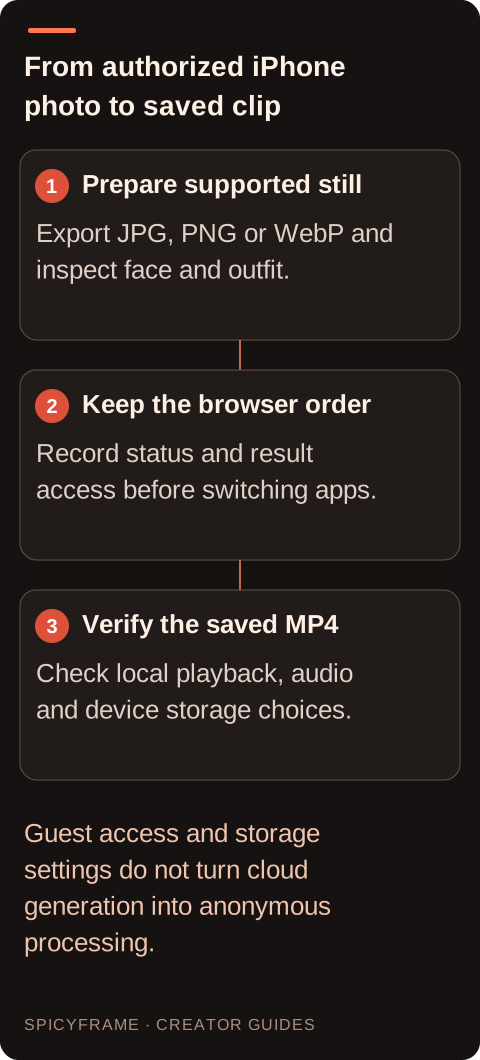
Creating NSFW-style AI video on iPhone means using the browser studio for a permitted, non-explicit adult glamour scene. Check that every depicted person is an adult and has authorized the transformation. Prepare a clear fashion photograph in JPG, PNG or WebP, with each file under 10 MB; up to 12 supported references can be supplied. If the phone stores the selected image as HEIC, export a compatible copy in a separate image tool before uploading. Choose the still that actually shows the intended outfit and pose, not merely the first thumbnail in the photo picker. Keep an original copy so preparation does not overwrite the approved source.
Use a short scene direction with one visible fashion action, such as a slight shoulder turn in an evening jacket under steady window light. Choose 5, 10 or 30 seconds and review the selected resolution and displayed price before paying. The result is a vertical 9:16 MP4 with generated ambient audio. Keep the order reference and any provided result access details before switching apps or networks. A browser tab is not a substitute for an order record. The generation time guide explains the broader waiting process, but no fixed completion deadline should be assumed. Guest purchasing is available; it does not make the transaction anonymous.
Look at the saved item's name, size and type in the device's file view. An unexpectedly tiny file or a document that opens as text may be an error response saved under a misleading name. A download interrupted by connection loss may also be incomplete. These observations suggest what to check, but do not prove one cause without comparison. Re-download once over a stable connection and give the transfer time to finish before opening it. Keep both filenames distinct so you do not accidentally test the earlier incomplete copy. If another device can retrieve the same completed result successfully, compare that working file with the one saved on the phone.
If the saved MP4 plays but the webpage preview does not, the immediate issue is likely within the preview or its access path rather than the adult fashion generation itself. If the preview plays but the saved file fails, focus on the transfer and local playback. If neither works, retain the exact error messages and test a fresh retrieval before drawing conclusions. A temporary result link may no longer be usable, but the presence of a broken link alone does not establish a specific expiration policy. The general FAQ is useful for the supported delivery workflow. Do not invent a link lifetime or assume every failed URL represents a failed render.
Try a different trusted local player or another device with the same downloaded file. Record whether the picture and audio both work. If the file plays elsewhere, the original device or app may have a compatibility or playback issue worth investigating. If it fails everywhere, focus on file completeness and retrieval. Avoid uploading authorized adult portrait footage to unfamiliar online repair services just to test compatibility. Also check available device storage before another download or conversion, since a full device can complicate saving files. These checks narrow the problem without asserting an unsupported list of codecs for every iPhone model, operating-system release or editing application.
Imagine an authorized adult model selects a portrait in a black evening jacket from an iPhone photo library. First export a supported still if the selected file is HEIC, then check the jacket and face in the uploaded preview. Generate a short, non-explicit pose change and preserve the order reference. After completion, download the original MP4 and play it locally with sound. If the saved copy fails after an interrupted transfer, retrieve it again over a stable connection using a distinct filename. This hypothetical example illustrates a browser-to-file workflow, not a tested device result. An external mobile editor can add approved titles or music afterward; the studio itself has no timeline editor.
If a complete original plays in one environment but an intended editor rejects it, a separate media conversion may be useful. Check the receiving editor's official documentation for the formats supported by the actual installed version, then export a compatible copy using a trusted tool. Keep the original untouched. Re-encoding can change picture quality, audio and file size, so inspect the converted result before discarding anything. SpicyFrame does not include a built-in compatibility transcoder or timeline editor. The vertical video guide explains the studio's delivery orientation, but orientation alone does not determine whether a specific external app can decode a file. Before paying on a small screen, inspect the upload preview deliberately rather than relying on the photo-picker thumbnail. Zoom where the browser allows and confirm that the intended adult face, jacket and hands are present. A neighboring image in the library may show a different pose or a less suitable crop even when the thumbnails look similar. Review the selected duration, resolution and price again after changing orientation or returning from another app. Keep a simple local note with the order reference and intended filename, avoiding sensitive payment details. When the clip finishes, test the downloaded file before sharing it into another application, since the sharing application may create a new derivative or change presentation. If privacy matters to the depicted adult, review who can access the phone and any shared albums or synchronized folders used for the project. These device-level choices are separate from the studio's storage setting. A careful phone workflow is less about specialized hardware and more about preserving the correct approved source, tracking the existing order and verifying the actual file that will be published.
Storage off prevents library and draft saving, while generation still requires processing the uploaded media. Do not interpret that choice as anonymity, offline generation or a promise that no processing occurs. Download the completed MP4 while it is available through the result flow, then confirm the local copy opens and contains the expected picture and sound. Review whether the device's own photo or file synchronization settings suit the sensitivity of an authorized adult portrait. The privacy guide provides product context; device backup behavior is a separate setting to inspect on the phone. Keep only the versions needed for the project and follow the depicted adult's agreed use and retention preferences. If the adult fashion clip cannot be retrieved or played, distinguish an inaccessible result page from an incomplete local download and an incompatible playback route. Record the order reference, device and software version, app or browser, and exact error wording. State whether the preview works, whether the file saves completely and whether the same original plays in another trusted player. Do not send unnecessary private portrait references or payment details with the report. A completed result with an iPhone playback issue is not automatically a failed generation. Preserve any working copy while support or a documented external conversion workflow resolves the delivery problem.
| Observation or goal | Recommended next step | What to verify |
|---|---|---|
| Preview spins while job is processing | Check order status | A completed result is available |
| Saved item is unexpectedly tiny | Retrieve a fresh original | Download completes as a media file |
| Local file plays but preview fails | Investigate the preview access path | The saved clip is intact |
| File plays elsewhere but not in one app | Check that app's documented support | A compatible copy opens correctly |
| No tested route can open the original | Preserve evidence and contact support | Order and error details are clear |
No. The container name alone does not establish compatibility with every player, editor, device or installed software version.
First check the existing order, retrieve its completed result and test the file. A transfer problem does not by itself justify another paid render.
The saved copy may differ or be incomplete, or local playback may be the issue. Compare a fresh download before deciding.
No. Access or link problems can be separate from generation status. Check the order record and available result flow.
Renaming does not convert media or repair an incomplete file. Use the original download or a separate documented conversion workflow.
Provide the order reference, device and software details, exact error, and whether preview, download and playback elsewhere succeed.