Does SpicyFrame provide scripted lip sync?
No. It generates ambient audio but has no scripted lip-sync control or guarantee that a depicted adult will deliver exact words.
SPICYFRAME · PRACTICAL GUIDES
Understand lip-sync limits for permitted adult glamour AI video, plan authorized narration separately, and verify any external speech editing.
5 seconds · 480p · $3.99. Pay per video, no subscription required.
Updated

A search for NSFW AI lip sync can describe several different goals: an adult fashion portrait with subtle facial movement, a clip with ambient sound, or a person appearing to deliver exact spoken words. Those are not equivalent capabilities. SpicyFrame generates native ambient audio with its vertical MP4 clips, but it does not provide a scripted lip-sync control or guarantee that a depicted adult will say a supplied sentence. Keep the scene permitted, non-explicit and authorized. If exact speech is essential, plan a separate production workflow before generating the image sequence. A moving mouth or voice-like sound in a result is not proof that the words are correct, synchronized or approved by the person represented.
Many fashion presentations can communicate a short message through captions or an external voiceover while the adult model remains in a natural pose. If the message explains fabric, collection details or the setting, a narrator does not necessarily need to appear to speak on screen. A visible speaker introduces additional requirements: approved words, permission for the representation, credible mouth movement and appropriate expression. The storyboard guide helps choose the role of speech. Avoid adding apparent dialogue merely because a portrait contains a face. The simplest accurate presentation may be a silent fashion gesture with a clearly separate authorized narration or readable text added in an external editor.
Permission to animate an adult photograph should not be assumed to include making that person appear to endorse a brand or say a new statement. Confirm the agreed use of the likeness and the exact words when visible speech is planned. Use an authorized recording or an appropriately licensed voice source, and do not imitate an identifiable person's voice without permission. Keep the non-explicit fashion context clear and avoid speech that changes the subject's intended representation. These are practical production decisions rather than a claim that the studio verifies every downstream edit. If authorization is uncertain, use a neutral narrator, captions or a different approved format instead of creating an apparent personal statement that the depicted adult has not accepted.
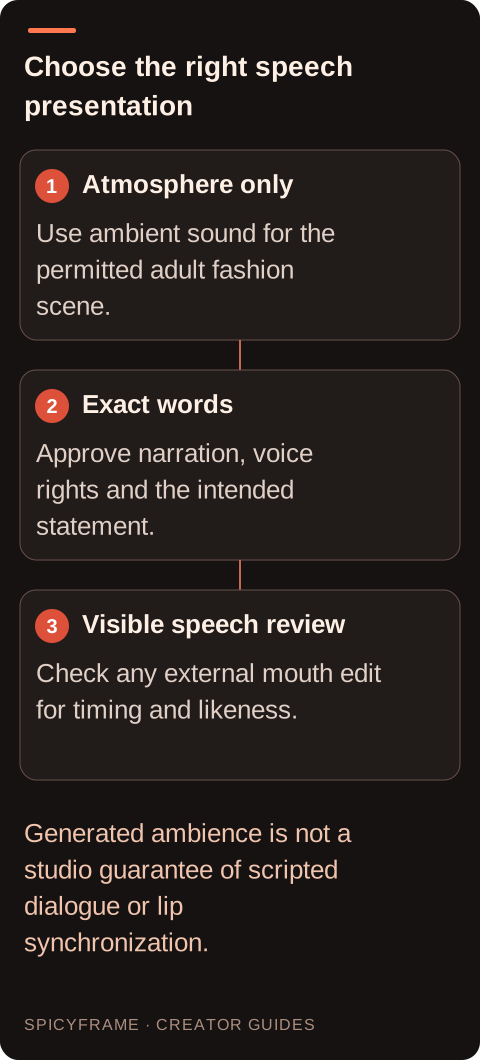
Write the exact narration separately from the visual direction and have it approved before editing. Check names, garment descriptions, claims and pronunciation. A concise sentence is easier to place naturally than a long paragraph squeezed into a short clip. SpicyFrame offers 5, 10 and 30 seconds per generation, so choose a visual duration that supports the intended message or plan a separate edited sequence. The native audio guide explains the atmosphere-focused role of generated sound. Do not promise that placing a script in the prompt creates exact dialogue. A visual brief can ask for a calm adult expression and restrained movement while the approved narration is recorded and timed independently.
If visible lip synchronization is truly required, use a separate tool whose current documentation explicitly supports the needed workflow and whose rules allow the authorized use. Check input requirements, voice permissions, language support and export behavior for the actual version rather than assuming every product has the same capabilities. Keep an untouched SpicyFrame master and make the speech-treated result a separate derivative. SpicyFrame has no built-in lip-sync timeline, voice-cloning control or guaranteed script performance. An external tool can also change the mouth region or broader face, so its output needs likeness review. The service FAQ provides product context; it should not be stretched into a claim about third-party speech capabilities or current proprietary pricing.
Imagine an authorized adult model in an evening jacket introducing a collection with a short approved line about the fabric. First decide whether the model must visibly say the line. If not, record an authorized voiceover and place it over a calm fashion shot in a separate editor. If visible speech is required and specifically approved, evaluate a documented external lip-sync workflow using the approved audio. Compare the resulting mouth, jaw, eyes and identity with the original. This hypothetical example is not a tested tool result or a promise of convincing synchronization. If the face changes or the words cannot be read naturally, choose the voiceover or caption version rather than presenting a distorted apparent endorsement as successful.
Watch the external speech edit at normal speed, then replay difficult word boundaries and pauses. Does the mouth close when the audio pauses? Do teeth, lips or jaw change shape unnaturally? Does the expression fit the approved sentence? Exact frame alignment is only one part of a believable result; a technically timed mouth can still change the adult's identity or imply an unintended emotion. Listen to the actual exported audio and verify every spoken word against the approved script. The fashion video guide helps maintain the overall editorial purpose. Reject errors in product claims or consent-sensitive wording even if the animation looks convincing, because visual polish does not correct a false or unauthorized statement. Prepare a speech approval record that distinguishes the words from the voice and the face. The script review confirms what is being said; the audio permission covers the recording or licensed voice source; the likeness approval covers the adult appearing to speak in the final presentation. One approval does not automatically answer the other questions. Keep the record practical and proportionate to the project, especially when the line includes a product endorsement or factual claim. After editing, have the final audiovisual result reviewed again because timing and expression can change how an otherwise approved sentence is perceived. A pause, smile or emphasized word may suggest a tone the original script did not communicate. For a purely informational fashion caption, this extra visible-speech complexity may provide little benefit compared with a separate narrator. Choose the presentation based on the audience's need, not on the availability of a mouth-animation effect. If the final result cannot maintain the person's approved appearance or accurately convey the statement, retain the clean fashion footage and deliver the message through an authorized voiceover or text instead.
Choose the final format according to the message and the review result: visible approved speech, separate narration or captions. Keep the source generation, approved script, authorized audio and editing project organized so corrections can be made without guessing which version was cleared. Verify that the exported MP4 contains the intended soundtrack and that no unwanted generated voice-like sound remains underneath. If the final piece could reasonably confuse viewers about whether speech was actually recorded from the depicted adult, use appropriate disclosure for the publication context. Do not claim the studio generated exact lip-synced dialogue when it did not. A clear, authorized fashion message is more valuable than a technically ambitious speech effect that changes the person or misstates what they agreed to say.
| Situation | Action | Verify |
|---|---|---|
| Only atmosphere is needed | Use appropriate generated ambience | No exact dialogue is assumed |
| Exact message needs narration | Record authorized audio externally | Wording and timing match the brief |
| Visible adult speech is essential | Evaluate a documented external workflow | Specific likeness and speech permission exists |
| Lip-sync edit changes the face | Reject or revise the external treatment | Identity and expression remain approved |
| Speech treatment is unconvincing | Use narration or captions instead | The fashion message stays clear and accurate |
No. It generates ambient audio but has no scripted lip-sync control or guarantee that a depicted adult will deliver exact words.
No. Keep approved wording separate and use an appropriate external narration or speech-editing workflow when exact words matter.
Do not assume so. Confirm authorization for the exact spoken representation and intended brand or product statement.
No. A separate authorized narrator or captions may communicate the message clearly while the adult model remains in a natural pose.
Check every word, mouth timing, teeth and jaw structure, facial identity, expression and the complete exported soundtrack.
No. Use an authorized recording or properly licensed voice source and obtain permission for an identifiable person's voice and representation.