Where is the negative-prompt field in SpicyFrame?
There is no separate negative-prompt field in the studio. Use a clear main brief and inspect the generated result.
SPICYFRAME · PRACTICAL GUIDES
Understand the lack of a negative-prompt field in adult glamour AI video, write permitted positive constraints and review the actual fashion result.
5 seconds · 480p · $3.99. Pay per video, no subscription required.
Updated

A search for NSFW AI negative prompt examples can lead to instructions intended for tools with a dedicated negative-prompt field. SpicyFrame does not expose that field, a seed control or a local masking panel. Do not present copied settings for another application as controls available in this studio. For authorized, non-explicit adult glamour work, describe the intended scene positively: the approved adult, intact outfit, one readable action, coherent camera framing and suitable light. A main prompt may include a clear constraint, but it is not equivalent to a separate negative-conditioning system and does not guarantee exclusion of every unwanted feature. Start from the real interface and supported workflow rather than inventing a hidden control based on terminology found elsewhere.
If the concern is a cropped collar, the useful goal is a medium portrait with space above the shoulders. If the concern is a changing outfit, identify the approved jacket and keep its defining details visible. If the concern is busy camera movement, request one steady viewpoint and remove conflicting movement language. These goals are easier to verify than a long list of errors the model should avoid. The prompt examples guide helps structure the brief. Do not assume a positive sentence enforces a technical lock; it clarifies the intended composition. After generation, check the actual collar, clothing and framing to determine whether the result meets the goal.
A negative phrase about blurred faces does not supply a clear face, and a request against distorted sleeves does not reveal a hidden cuff. Inspect the authorized adult reference for focus, pose and garment detail before adding more text. Choose a compatible source with visible anatomy and enough space for the planned gesture. The photo preparation guide provides a practical checklist. If a garment is dark against a dark wall, another approved photograph with clearer separation may help the brief more than a lengthy prohibition. Keep the outfit intact and non-explicit. The reference and prompt should describe the same allowed fashion scene rather than asking the model to reconcile contradictory evidence.
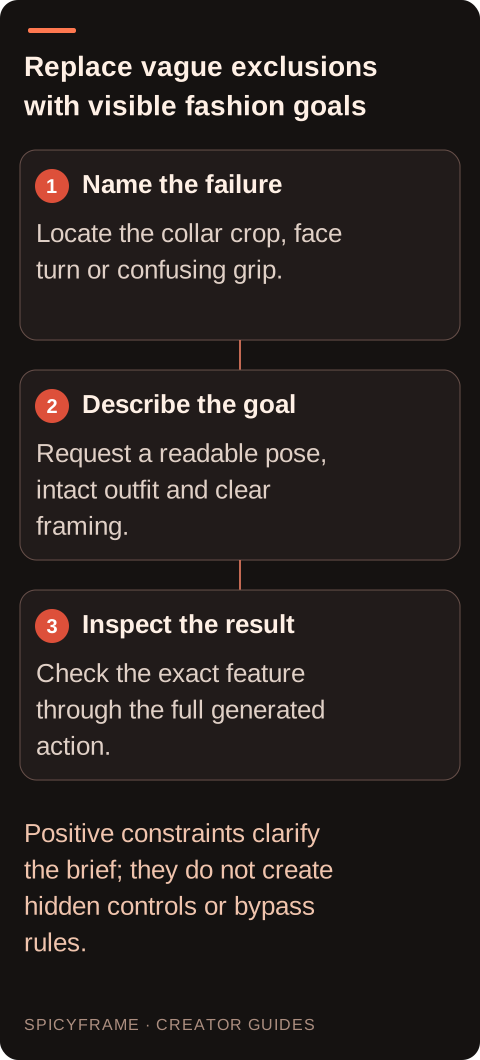
A brief that requests a full turn, a hand near the face, a moving camera and several changing lights creates many details to inspect. Adding a list of unwanted anatomy and texture errors does not remove that complexity. Retain the single fashion action the project needs, then simplify the viewpoint and lighting around it. The glamour prompt guide offers permitted styling context. A restrained adult pose can still communicate confidence through clothing, expression and composition without elaborate movement. If the result remains wrong, identify the first failure point and revise the relevant part of the scene. Avoid accumulating generic prohibitions that make the brief longer without explaining what the viewer should actually see.
Negative prompting is not a method for overriding content rules. Do not ask for filters to be ignored, disguise disallowed content with coded language or translate the same refused request to try another route. This workflow covers permitted, non-explicit adult fashion using authorized references. If a request is refused, read the actual message and review the requirements. A genuinely different allowed concept can be considered on its own terms, with no guarantee of acceptance. Quality constraints such as steady framing or an intact jacket concern how an allowed scene should look. They do not authorize explicit content, non-consensual depictions or a promise that particular words will prevent moderation. Keep those categories separate in both the brief and troubleshooting notes.
Imagine a prompt for an authorized adult in a velvet jacket that asks for an orbit, a sunglasses gesture, flashing red and blue light and a full turn. It ends with a long list of unwanted distortions. The result changes the face when the hand crosses it and crops the collar during the camera move. Rewrite the visible goal: “The adult model in the approved velvet jacket makes a slight glance, hands remain below the shoulders, steady medium portrait, soft red side light and quiet room ambience.” This hypothetical revision is not a tested repair. It removes competing actions and states inspectable conditions; it does not create a negative-prompt field or guarantee that the next generation will preserve every detail.
Use the original result to locate whether the main issue is likeness, hand contact, clothing, light or viewpoint. The artifact guide helps classify those visible problems. If the face changes during a large turn, try a smaller angle or clearer compatible reference. If a clutch merges with fingers, simplify the hold. If the background pulses, remove conflicting light cues before changing unrelated clothing language. Record the revision and compare the next result, acknowledging that separate generations vary. SpicyFrame has no seed control for an identical repeat. A practical improvement can justify a revised brief without proving that a particular word caused or solved the hidden generation process. Compare an exclusion list with the original creative problem before keeping any part of it. If a previous clip showed a cropped hand, a list mentioning blur, noise, extra limbs and poor anatomy may obscure the simple need for a wider frame and a restrained gesture. If a necklace changes during a turn, the relevant evidence may be a clearer view of that necklace rather than a generic demand for perfect quality. Translate only the specific useful intention into the main brief, then remove unrelated terms. Maintain the fuller quality checklist outside the prompt so the reviewer can still inspect every required feature. This keeps a short adult fashion direction from becoming internally contradictory. It also makes later revisions easier to explain: the change was more room around the clutch, a smaller shoulder turn or consistent soft light. Do not claim that particular positive phrases are guaranteed alternatives to a technical negative-conditioning system. They are communication choices within the supported workflow. Their value is that they express what should be visible and give the subsequent review a concrete target.
The prompt should communicate the scene, while a separate checklist records the details you will verify: recognizable adult likeness, intact approved garment, readable hands, steady light and appropriate sound. This separation prevents the prompt from becoming a long catalog of every possible failure. After downloading the MP4, watch the complete clip and inspect the largest movement and ending. If an external trim or repair is appropriate, perform it in a separate editor and review the final export. The studio has no built-in timeline or local mask. Save the accepted brief and source with the result, and revise only the parts relevant to the next fashion scene. Clear intention plus honest inspection is more useful than unsupported claims about hidden negative controls.
| Situation | Action | Verify |
|---|---|---|
| Want a visible complete collar | Specify comfortable medium framing | Collar remains inside the frame |
| Want stable clothing | Identify the approved intact outfit | Seams and coverage persist through movement |
| Prompt contains many competing actions | Keep one primary gesture | The result has a clear review target |
| Copied workflow requires a negative field | Use only supported studio controls | No invented feature is claimed |
| Request was refused | Review requirements and allowed concepts | No disguised repetition of disallowed content |
There is no separate negative-prompt field in the studio. Use a clear main brief and inspect the generated result.
They do not create unsupported controls. Translate the useful intention into an observable permitted scene requirement instead.
No. It states the desired styling, but collar, cuffs, seams and coverage still need review throughout the clip.
No. Do not use coded terms, translations or exclusion lists to conceal a disallowed request or evade moderation.
A clear authorized reference, a simple readable pose and a focused review of the actual failure point.
SpicyFrame does not expose seed controls. Separate generations can vary even when the visible prompt and references are similar.