Does SpicyFrame generate audio with the video?
Yes, native ambient audio is part of the generated clip. Exact narration, dialogue or a particular song is not guaranteed.
SPICYFRAME · PRACTICAL GUIDES
Plan sound for permitted adult glamour AI video, distinguish generated ambience from narration, and verify any licensed music added externally.
5 seconds · 480p · $3.99. Pay per video, no subscription required.
Updated

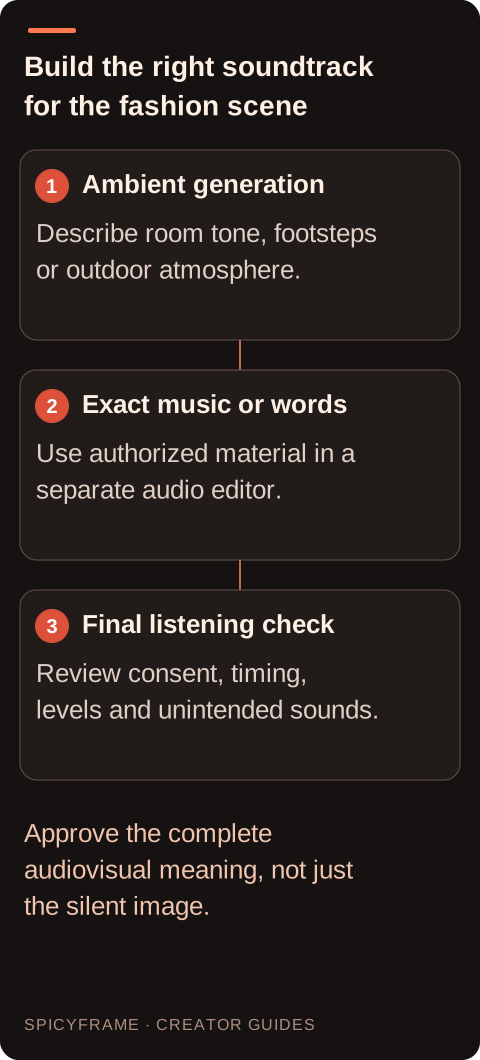
An adult glamour video can use restrained room ambience, footsteps on a runway or the quiet movement of fabric to support its visual mood. SpicyFrame generates native ambient audio with the clip, but it does not guarantee a particular song, spoken script or precisely synchronized dialogue. Here NSFW-style describes permitted, non-explicit adult fashion; it is not a request for sexual audio. Decide whether the soundtrack needs atmosphere, a licensed musical identity or an informative voiceover. Those are separate production goals. Generate the visual scene and suitable ambience, then use a separate editor when the project requires exact words, approved music or a carefully controlled mix.
Inspect the video player's mute control and volume setting, then confirm the device is sending sound to the expected output. Headphones, speakers and connected wireless devices can make an otherwise working clip seem silent at the screen. Test a known audible file in the same player at a comfortable volume. If that file is also silent, troubleshoot playback before investigating the generated clip. Avoid turning the volume to its maximum while repeatedly testing unknown audio, because a later section may be much louder. Reopen the same saved video once the output path is clear. This simple comparison establishes whether the device can play sound under the conditions you are actually testing.
Browser previews may start muted or behave differently from a saved file, depending on the player and environment. A silent preview therefore does not establish that the downloaded MP4 has no audio. Play the original locally and listen through the whole duration. Conversely, if the preview has sound and a separately edited copy does not, investigate the copy's export settings. Keep filenames distinct so the comparison is reliable. The native audio guide explains the intended role of generated ambience. If the available result link does not work, resolve retrieval first; a failed download or stale preview provides little evidence about the completed file's audio content.
A trusted local media information view or separate editor can show whether the file contains an audio stream. If there is no track, record that observation along with the order reference and the exact file tested. If a track exists, inspect its waveform or meters while listening at a reasonable level. A track can contain very quiet or silent material, so track presence alone does not prove useful sound. Do not infer a specific codec fault without evidence. If the original plays with audio in one player but not another, the issue may belong to that playback route. Keep the untouched original available for comparison throughout the investigation.
Match sound to visible surroundings. A quiet dressing-room portrait might need soft room tone; an eveningwear walk might need restrained footsteps; an outdoor fashion image might need distant city ambience. Do not ask ambient generation to deliver a brand statement word for word or to imitate a real person's voice. If speech carries required information, record an authorized narration separately and verify its wording. Keep sexualized sound cues out of the brief. The storyboard guide helps decide whether an audible event supports an action or distracts from it. Listen to the complete result, since a suitable prompt does not guarantee that every generated sound will fit the approved mood.
Imagine a ten-second eveningwear scene whose webpage preview appears silent. The downloaded MP4 plays faint studio room tone through headphones, while the phone's preview player had been muted. The appropriate fix is to adjust playback and verify the intended publishing preview, not to regenerate the visuals. In a different hypothetical case, the original download contains an audio track but no audible material throughout, even in another player. That warrants documenting the file and checking support options before making assumptions. These examples are diagnostic illustrations, not reports of tested incidents. The crucial distinction is whether usable sound exists in the original file under a confirmed working playback setup.
If the picture is usable but the ambience does not suit the editorial style, import the downloaded MP4 into a separate editor and keep an untouched original. Mute or lower the generated track, then add music you have permission to use or an authorized recorded narration. Check the license for the actual publication context instead of assuming a track is cleared because it is easy to download. Avoid adding speech that falsely suggests the depicted adult endorsed a product or delivered words they did not approve. SpicyFrame has no built-in audio timeline. The social publishing guide offers delivery context, while the final music choice and mix remain external editing decisions. Judge the apparent distance of the soundtrack against the camera framing. A close portrait with loud footsteps can imply movement the viewer does not see, while a full outfit shot in a large room may feel mismatched with an intimate recorded whisper. For this non-explicit fashion workflow, choose neutral, scene-appropriate atmosphere rather than sexualized audio cues. If music carries the rhythm, decide where its accent falls relative to the shoulder turn or final pose. A loud accent can make a small gesture appear more dramatic, which may or may not match the approved representation. Compare the clip once with sound and once muted to understand how the soundtrack changes its meaning. In an external mix, keep narration intelligible without making quiet fabric or room sound unnaturally prominent. Check the license and approved wording before spending time on a detailed mix, because an attractive track that cannot be used in the intended placement is not a viable final asset. Preserve the clean visual master so alternate authorized soundtracks can be tested without repeatedly exporting and degrading the picture.
After any external edit, reopen the exported MP4 and listen from the first moment to the last. Confirm that audio was included, the intended track is selected and the ending does not cut off abruptly. Check for clicks, large level jumps and long accidental silences. Listen through headphones and a typical phone speaker where practical, keeping volume comfortable. If the clip will be uploaded, review the upload preview too because a destination may handle sound differently from the local player. A waveform in the editing project is not enough; the audience hears the exported and delivered file. Keep that distinction clear when approving a corrected version. Review the final export with the approved visuals and soundtrack together. A dramatic musical accent can change the meaning of a neutral pose, so assess the complete presentation rather than treating audio as decoration. Confirm that narration is authorized, wording is accurate and no unexpected generated voice or sound remains beneath the replacement track. If the original completed file seems technically silent, provide the order reference and playback evidence through the support flow described in the FAQ. Confirmed generation failures have a credits or refund process; an unwanted but completed creative soundtrack is a separate editing or creative-choice issue.
| Observation or goal | Recommended next step | What to verify |
|---|---|---|
| Preview is silent but local file is audible | Adjust preview playback | The intended output device is active |
| Every file is silent in the same player | Check device and player settings | A known audible file works |
| Original has no reported audio track | Preserve the file and report evidence | The completed order and filename match |
| Track exists but ambience is too quiet | Listen carefully and assess external adjustment | Noise does not become distracting |
| Sound exists but does not fit the brief | Replace or mix it externally | Rights, timing and final export audio |
Yes, native ambient audio is part of the generated clip. Exact narration, dialogue or a particular song is not guaranteed.
It may be muted or use a different playback path. Check the controls and compare with the completed original download.
No. A track may contain quiet or silent material. Listen and inspect its levels before deciding it is usable.
There is no built-in audio timeline. Combine a recorded or licensed voiceover with the downloaded video in a separate editor.
First decide whether the visuals are usable. An external soundtrack replacement may address the creative mismatch without another visual generation.
Record the order reference, exact file, playback comparisons and media-inspection result so support can assess the delivery issue.