5 seconds · 480p · $3.99. Pay per video, no subscription required.
Updated
AI-generated editorial illustration: an adult fashion look in red city light. This is a styling reference, not a video-generation result.
Define a fashion profile, not an invented biography
A Fanvue AI profile video can introduce an adult fashion creator's visual style, but it should not manufacture a real person's history or endorsement. Decide whether the profile represents an actual consenting adult, a clearly fictional adult character, or a designer presenting a body of visual work. These are different identity claims. A hypothetical fictional model in a tailored burgundy suit can illustrate an editorial color palette; the caption should not say that this character attended a real runway show. Write the identity description before planning motion. Keep the presentation non-explicit and focused on clothing, styling and the creative process. A polished profile should help viewers understand who made the work and what kind of work it is, without relying on ambiguity about whether a depicted person exists.
Treat platform permission as a separate decision
This guide could not verify the complete current Fanvue AI policy from its official help page during research. It therefore does not assert specific verification procedures, exact disclosure wording, eligibility or an entitlement to publish. Check the current official creator terms, AI guidance and the controls displayed in your account before uploading. Ask official support about a specific uncertainty using a description of the proposed non-explicit fashion profile. Keep any answer with the brief and its date. Being able to generate a video in SpicyFrame does not establish that another platform accepts it. Likewise, a visible AI label does not override identity, consent, intellectual-property or content restrictions. Resolve the permitted use first, before paying for a sequence designed around a profile surface you may not be able to use.
Build a coherent identity reference set
Choose authorized photographs of the same consenting adult or original images of the same clearly adult fictional character. Do not combine a real person's face with someone else's body, clothing photograph or personal biography without the necessary permissions. Record the lead image for face and hairstyle, the wardrobe view for the suit, and any authorized environment reference. Avoid contradictory hair colors, changing accessories or images from different character designs. The reference consistency guide explains how to give each image a clear role. Inspect the proposed profile avatar beside the video reference: they should represent the same declared identity. If the persona is fictional, maintain that description in the profile text and project records rather than using a realistic face to imply a real person behind every depicted action.
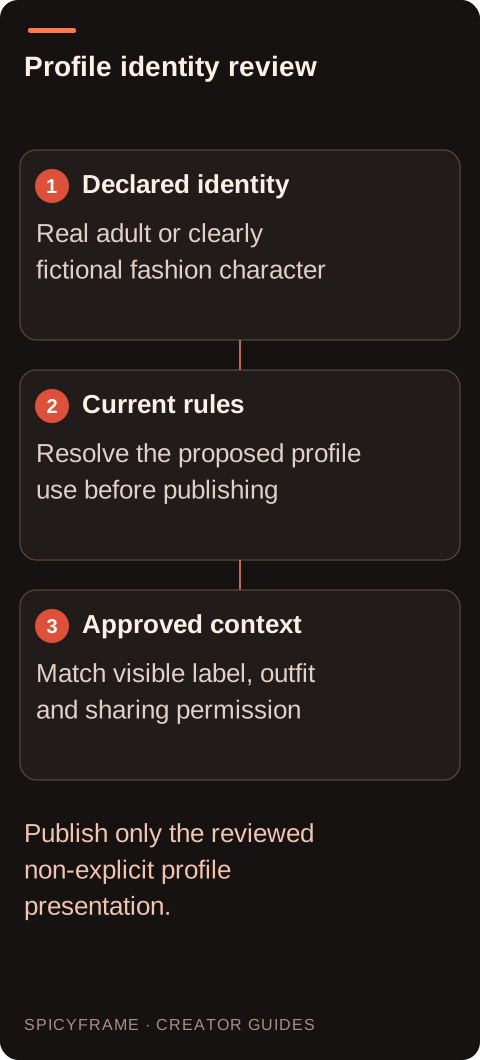
Declared identity: Real adult or clearly fictional fashion character. Current rules: Resolve the proposed profile use before publishing. Approved context: Match visible label, outfit and sharing permission. Publish only the reviewed non-explicit profile presentation.
Choose motion that introduces the styling
Plan one short, non-erotic gesture that shows the outfit and face clearly. For a hypothetical tailored-suit introduction, a simple glance toward the camera and a restrained shift of the jacket can be sufficient. Avoid framing that isolates intimate body areas, undressing, or movement that changes the garment's coverage. A slow forward camera move can connect the opening portrait to the final expression without inventing a full catwalk event. The fashion video guide helps distinguish a styling presentation from a claim about real filming. Keep the background calm enough for an external identity label. Judge whether the gesture communicates the intended editorial tone before adding more motion; an elaborate reveal can undermine both identity consistency and the clarity of the profile introduction.
Place identity information in accurate external text
Add the chosen creator name, fictional-character description or AI-treatment note through an external editor or the platform's available tools. Do not rely on generated signage or lip movement to communicate identity. Exact names can deform during animation, and SpicyFrame does not provide scripted speech synchronization. The wording should describe the actual production method without suggesting that a fictional character has independently verified credentials. If the profile represents a real adult, agree on the displayed name and whether the video may be reused elsewhere. Review the label against the current platform requirements after they have been checked. A clear explanation should remain visible in the relevant context, including a muted preview or a shared still, instead of existing only in a separate post that viewers may never encounter.
Test profile recognition before a final export
Use the first paid draft to answer a profile-specific question: does the same declared adult identity remain recognizable while the suit and expression stay within the approved brief? A five second Medium 480p clip costs $3.99 and can expose face or lapel drift before a larger purchase. High 720p and Ultra 1080p are available, but neither guarantees exact likeness. SpicyFrame accepts up to 12 authorized JPG, PNG or WebP references under 10 MB each and exports vertical 9:16 MP4 with ambient audio. Keep the trial private until the current profile rules and final adult approval are resolved. Add the creator name and synthetic context externally, then check the crop in the actual permitted placement. The studio does not install a profile asset or publish it automatically. Preserve the approved identity wording beside the master so a later editor cannot accidentally detach the animation from the explanation that makes its presentation honest.
Review likeness, coverage and disclosure together
Watch the entire rendered clip beside the approved references. Check eye shape, hairstyle, jacket lapels, sleeve edges and any visible jewelry. A face that drifts into another person's likeness or a jacket that opens unexpectedly is a reason to reject the treatment, not merely an aesthetic quirk. Use the artifact review guide for recurring geometry problems. Also inspect the selected poster, because it may communicate a different impression from the full clip. Review the identity label and profile description at the same time as the picture. If a viewer could reasonably mistake a fictional fashion character for the real account holder, revise the context. Obtain final approval from the depicted adult when a real likeness is used, including the intended audience and any commercial association.
Deliver only the approved profile version
Check the current upload settings for the specific profile placement and prepare any required crop or derivative externally. This article does not promise an accepted aspect ratio, file limit or banner feature. Preview the processed upload on a phone and ensure that the face, clothing and identity context remain readable around interface elements. Keep the approved MP4, source permissions, final profile wording and review date together. A later wardrobe change or new platform rule may require another review rather than a silent reuse of the old asset. The privacy guide explains why private studio storage and public profile sharing are separate decisions. Do not turn a private approval into permission for advertisements, reposts or collaborations without checking that those uses were actually agreed.
Fanvue AI profile video: identity and presentation: review decisions
Decision
Practical action
Approval evidence
Declared identity
Choose real consenting adult or fictional adult
Profile wording matches the source
Platform permission
Check current official creator guidance
Specific proposed use has been reviewed
Wardrobe motion
Use a restrained styling gesture
Coverage remains consistent in every frame
Identity label
Place exact wording externally
Name and AI context remain readable
Publication scope
Approve audience and reuse explicitly
Final profile file matches that permission
AI image-to-video questions answered
Does this guide confirm Fanvue currently accepts my AI profile?
No. The full current official policy was not available for verification here. Check the current creator terms, AI guidance and account controls, and resolve uncertainty with official support before publishing the proposed fashion presentation.
Should a fictional adult character be described as fictional?
Use honest identity context and the platform's current required disclosures. Avoid biographies, credentials or real-world event claims that encourage viewers to believe a generated character is a particular real person.
Can I use my photographer's portrait as the reference?
Only if the image license and the depicted adult's consent cover the AI transformation and intended profile use. Permission to possess a portrait does not automatically authorize every derivative or commercial presentation.
Can the video preserve my creator name on a jacket?
Exact lettering is not guaranteed. Add the name accurately in external typography and inspect the garment separately, particularly if the jacket's real branding or embroidery matters to the presentation.
Is a profile approval also permission to run an advertisement?
Not automatically. Agree on paid distribution, audience, duration and any brand association separately, and review the advertising rules for the actual placement before adapting the approved profile asset.
What if the outfit becomes more revealing during the animation?
Reject that result and simplify the movement or source. The agreed non-explicit fashion presentation must remain intact throughout the clip, including individual frames that could be saved or shared.