Is Grok available on both iPhone and Android?
The official X Help page describes Grok within X on iOS, Android and web where X is available. That general statement does not confirm every specific Spicy feature.
SPICYFRAME · PRACTICAL GUIDES
Check Grok access on iPhone and Android by identifying the official app, account and current controls, without relying on outdated menus or unlock claims.
5 seconds · 480p · $3.99. Pay per video, no subscription required.
Updated

A search for Grok spicy mode on Android or iPhone often assumes that general app access and a specific image or video style are the same entitlement. They are not established by the same evidence. The official X Help page says Grok is available within X on iOS, Android and web where X is available. It does not provide a current Spicy feature matrix for every mobile account or standalone product. This guide therefore gives a practical access check rather than an invented menu walkthrough. The broader Grok spicy guide provides context. Start by identifying exactly which official app or site you are using and what function is missing.
A phone can access related services through more than one surface. An in-app Grok experience, a standalone app and a browser tab may display different navigation and account states. Similar names or icons do not prove that controls are identical. Record the official product name and the account currently signed in before comparing screenshots. A tutorial made for another surface may be accurate in its own context while being useless for yours. Do not assume a missing style button is an Android or iPhone defect simply because another device shows a different screen. The first diagnostic task is matching the product and account, not finding a guessed location for a control that may not be offered.
Install or update the relevant app through its official distribution route and verify that the publisher is legitimate. Do not use modified packages or services promising to restore restricted controls. An ordinary update can address a stale interface or bug, but it does not guarantee a particular account entitlement. Preserve important session and order information before changes that may sign you out or clear local data. If the app loads inconsistently, check ordinary connectivity and supported troubleshooting guidance. Keep these steps proportionate to the symptom. A missing feature after a clean official update remains an access question; it should not be explained away with increasingly speculative device changes or unsupported unlock instructions.
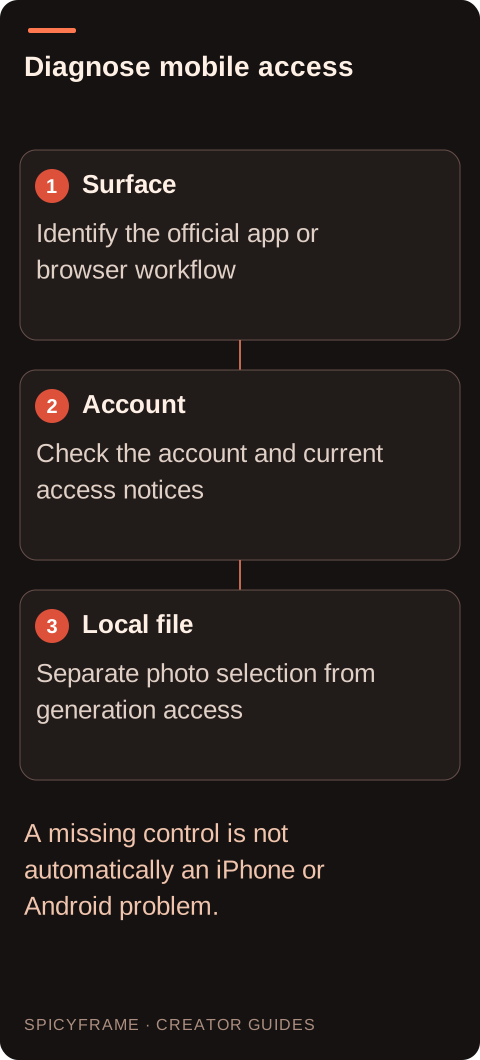
Confirm that the account in the mobile app is the one whose plan or access you intended to use. Read any official notice about the desired function, and compare it with the current account information. Do not assume that a purchase made in one product surface automatically grants every feature in another. If a plan page explicitly includes the function, keep that evidence and use official support if the account does not reflect it. If no such statement exists, do not buy merely because a tutorial says it will help. The Grok image-to-video guide covers the broader creative task, while current official account information should determine whether the mobile workflow is actually available.
A phone may prevent an app from seeing a selected image because of local photo permissions or because the file is stored in a way the picker cannot currently access. That is different from a missing video style or a moderated request. Follow the operating system's current permission controls and grant only the access needed for your intended authorized photo. Check whether the selected image actually appears in the official workflow before diagnosing generation. Do not upload unrelated private images just to test access. For a non-explicit adult glamour project, use a clearly authorized reference and inspect its crop and detail. The reference photo guide helps assess the image once local selection works.
Suppose an adult creator sees Grok in the X app on an iPhone but cannot find the style control shown in an Android tutorial. A useful plan is to record the exact product surfaces, app versions and account context before concluding that the operating system is the cause. The creator checks current official notices and confirms whether the tutorial refers to the same workflow. This is a hypothetical diagnostic example, not a tested device comparison. If the photo picker works but the style remains absent, those observations should stay separate. A support request can then describe the missing control precisely without exposing private glamour references or claiming an unverified regional, subscription or device restriction.
Phone photos may need external preparation depending on the destination's supported formats. Verify Grok's current official requirements rather than borrowing another service's limits. For comparison, SpicyFrame accepts authorized JPG, PNG and WebP stills under 10 MB each, up to 12 references; HEIC and animated formats need preparation outside it. That is a separate product specification. If you choose SpicyFrame, the output is one vertical 9:16 MP4 with ambient sound, and guest purchase is available. The guest video guide explains that workflow. Mobile convenience should not obscure the distinction between selecting a local image, submitting it for processing and saving the finished file after generation.
After the checks, decide whether the issue is an official interface mismatch, an account question, local file selection or a request-specific moderation notice. Each has a different next step: consult matching instructions, contact account support, adjust supported photo access, or read the stated content reason. If the cause remains unknown, say so rather than inventing a phone-specific explanation. Keep the intended scene within non-explicit adult glamour and avoid unofficial unlock paths. A mobile workflow is ready when the actual controls, source access and delivery conditions are understood. That conclusion is more useful than a universal sequence of taps that could be wrong for the user's app version or unavailable feature set.
| Requirement | Decision | Evidence to check |
|---|---|---|
| Tutorial and app screens differ | Match product surface first | X, standalone and browser contexts are distinguished |
| Expected plan is not reflected | Verify the signed-in account | Official entitlement evidence is available |
| Photo picker cannot access a file | Check supported local permissions | Selection works before generation is diagnosed |
| App is outdated or unstable | Use an official update | No feature entitlement is assumed |
| Specific control remains absent | Record the observation for support | Cause is not guessed from the phone brand |
The official X Help page describes Grok within X on iOS, Android and web where X is available. That general statement does not confirm every specific Spicy feature.
It may show another product surface, account state or app version. Match those details before attributing the difference to the operating system itself.
An official update may fix ordinary interface issues, but it does not guarantee feature entitlement. Use current account notices and official documentation to establish access.
Check the phone's supported photo permissions and whether the selected file is locally accessible. File selection problems are separate from video feature availability or moderation.
No. Use official distribution and support. An unofficial package or unlock service is not a trustworthy way to resolve the provider's current access conditions.
Do not assume so. Verify the requirements of the exact workflow. SpicyFrame's file limits, for example, should not be presented as Grok's consumer-app requirements.
External pages, opened in a new tab. Rankings reflect the time of writing.