Can SpicyFrame generate more than thirty seconds at once?
No. Native clip durations are 5, 10 and 30 seconds. Longer presentations require separate clips and external editing.
SPICYFRAME · PRACTICAL GUIDES
Choose one 30-second adult glamour scene or an externally edited sequence of short clips by comparing outfit continuity, pacing, costs and review.
5 seconds · 480p · $3.99. Pay per video, no subscription required.
Updated

A long NSFW AI video request can mean one sustained adult glamour shot or a longer sequence assembled from several clips. SpicyFrame generates 5, 10 or 30 seconds per clip, with a maximum native duration of 30 seconds. It does not offer unlimited continuous output or a built-in timeline for joining scenes. Keep the concept permitted and non-explicit, using authorized adult references. Decide whether the viewer needs time to observe one outfit or needs several views that make different points. A continuous portrait can preserve a calm editorial mood; a sequence can show the adult model, garment detail and setting separately. These are creative structures with different continuity and editing requirements, not simply different numbers on a duration selector.
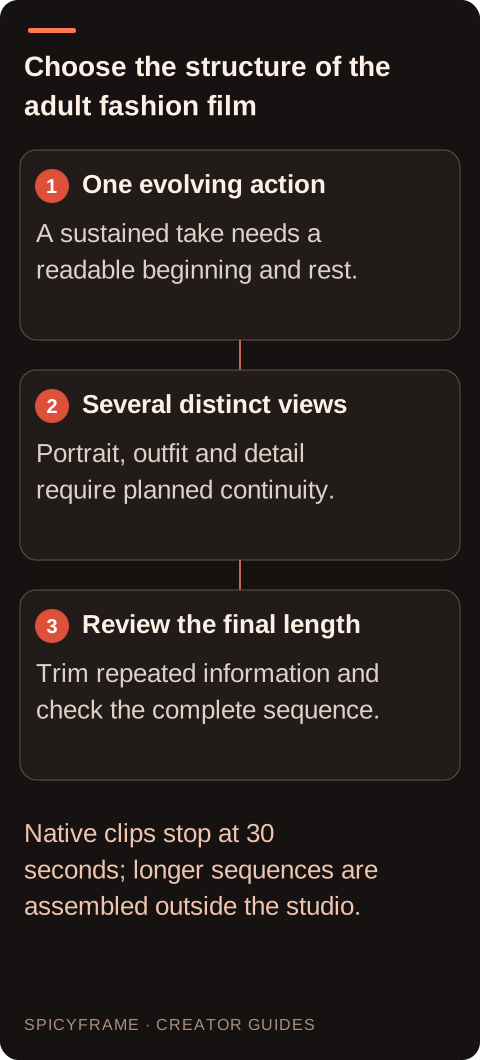
A thirty-second scene needs an action that can develop without becoming a list of unrelated events. A restrained walk that settles into a pose or a calm full-outfit presentation may have a readable beginning, middle and ending. Asking for repeated turns, accessory changes and several locations places many demands on continuity. Longer duration also gives viewers more opportunities to notice changes in likeness, fabric or background. The duration guide explains general pacing, while the glamour-specific decision is whether the clothing and expression remain worth watching throughout the take. If the strongest idea lasts only a few seconds, extending it does not automatically add value. Plan a natural ending rather than waiting for the selected duration to expire.
Separate shots can give the face, silhouette and accessory their own clear composition. A sequence might begin with an adult portrait, move to a full outfit and finish on an approved clutch detail. Each clip still needs its own authorized references, clear action and review. Identity, makeup, garment color and lighting can vary between generations, so matching them is an editorial task rather than a built-in character lock. The storyboard guide helps assign a purpose to every shot. Generate only the views the sequence requires and leave room around intended cut points. SpicyFrame has no timeline editor; ordering, trimming, transitions and final audio mixing happen in a separate editing application after the clips are downloaded.
At High 720p, one thirty-second clip costs $24.99, while three ten-second clips cost $26.97 in total at $8.99 each. At Ultra 1080p, one thirty-second clip costs $70.99 and three ten-second clips total $71.97 at $23.99 each. These figures compare generation purchases only; they do not make the results interchangeable or account for external editing work. Medium 480p is $11.99 for thirty seconds or $4.99 for each ten-second clip. Review the studio price before paying and choose according to the shots needed. A sequence that requires six separate ideas is not made equivalent to one continuous take by dividing durations on paper. Budget for the actual creative structure and the possibility that a result may not meet the brief.
For a multi-clip adult fashion sequence, compare collar shape, sleeve length, jewelry, hairstyle and visible makeup before thinking about elaborate transitions. A change in a small accessory can be conspicuous when two similar portraits sit next to each other. Use compatible references and repeat the essential outfit description without assuming exact replication. If a mismatch remains, decide whether a different shot size or a purposeful cut to another view makes it acceptable. Do not hide a material product difference if the sequence is meant to represent a real garment accurately. The fashion video guide provides broader styling context. Review the assembled sequence at normal speed, because a mismatch can become more apparent across a cut than within either clip alone.
Imagine an authorized adult model presenting a velvet suit for a short editorial feature. One option is a thirty-second view with a slow entrance, settled pose and restrained glance. Another is three ten-second clips: an establishing outfit shot, a closer portrait and a detail view of the approved lapel. The first depends on sustained motion and continuity; the second depends on matching generations and external editing. This hypothetical comparison is not a tested quality result. Choose the single take if its calm development is the point. Choose the sequence if each view explains a different fashion detail. If the entire message is a single confident pose, a five- or ten-second clip may be the stronger final piece.
Download the original MP4 for each accepted clip and keep them organized by shot purpose. In a separate editor, arrange the story before adding transitions or music. Trim redundant openings and endings so the sequence does not pause every time a new clip begins. Check whether generated ambient audio changes abruptly between shots; use an authorized continuous sound bed or careful external edits where appropriate. Keep an untouched copy of every source. The thirty-second guide helps distinguish native duration from a constructed sequence, but joining clips does not create a single continuous generation. Label the workflow accurately when discussing how the piece was made, especially if continuity is part of a client requirement. Sketch the proposed sequence as a set of viewer questions. The first shot might answer who the adult model is, the second how the complete outfit sits, and the third which accessory completes the styling. If two shots answer the same question in nearly the same way, one may be unnecessary. For a single take, ask how the answer develops over time: the movement might reveal the jacket silhouette and then let the viewer study it. This approach exposes a common planning mistake in long fashion videos, where duration is purchased before the story is defined. It also helps decide which continuity differences matter. A deliberate cut to a clearly different approved look can belong in an editorial sequence, while an unnoticed button change between supposedly continuous views can undermine it. Record whether each cut represents the same moment, a new view or a new outfit. That information gives the external editor a clearer task and prevents a transition effect from being used to disguise an unresolved styling decision. Length becomes the consequence of the information and mood, rather than the starting specification for every creative choice.
Watch the finished take or sequence without focusing on the work invested in it. Identify where attention drops, where the outfit information repeats and where a cut feels necessary. Check the adult likeness, clothing, background and audio throughout, not just in the best moments. Remove duration that adds no useful mood or information. If a platform or placement has a specific limit, confirm it for the intended use instead of assuming a universal rule. Keep a shorter approved version when the story supports one. The final choice should reflect what the audience needs to see: a coherent sustained fashion moment or a clearly edited sequence of distinct views, each with a reason to exist.
| Situation | Action | Verify |
|---|---|---|
| One calm outfit moment | Choose a short or sustained single take | The action justifies its full duration |
| Portrait plus silhouette plus detail | Plan separate clips and external editing | Each shot contributes different information |
| Need more than thirty seconds | Assemble a sequence externally | No claim of unlimited native generation |
| High 720p: 30s versus three 10s | Compare $24.99 with $26.97 | Creative and editing needs decide the choice |
| Ultra 1080p: 30s versus three 10s | Compare $70.99 with $71.97 | Continuity matters more than tiny cost differences |
No. Native clip durations are 5, 10 and 30 seconds. Longer presentations require separate clips and external editing.
No. Compare the exact tier and durations; price totals can be close, and the creative results are not equivalent.
No. Reuse compatible authorized references and inspect garment, makeup and accessory continuity across every planned cut.
There is no built-in timeline editor. Assemble and mix the downloaded clips in a separate application.
When one pose, expression or garment detail communicates the full idea without needing a longer progression.
First confirm that shot order, likeness, clothing and audio continuity work. Transitions cannot reliably repair a mismatched fashion story.