What is a reference conflict worksheet?
A brief record of disagreements in adult appearance, garment, accessories and light, with the approved final state and a remove, replace or reassign decision.
SPICYFRAME · PRACTICAL GUIDES
Resolve conflicting adult glamour references by comparing makeup, jacket details, accessories and light before removing, replacing or reassigning images.
5 seconds · 480p · $3.99. Pay per video, no subscription required.
Updated

An adult glamour reference set can contain individually strong photographs that disagree with each other. The face image shows one makeup look, the full-length view has a different jacket closure and the setting image suggests light from the opposite side. Before adding more references, identify the contradiction that the generation is being asked to resolve. Use only authorized images of adults for a permitted, non-explicit fashion scene. SpicyFrame accepts up to 12 JPG, PNG or WebP files under 10 MB each, but capacity does not resolve incompatible evidence. This guide focuses on reconciliation; the ordinary reference workflow covers basic upload roles. The aim is an approved coherent set, not a larger collection of attractive but competing images.
Place the candidate photographs side by side and record four comparison fields: adult appearance, garment construction, accessories and lighting. For each disagreement, write the intended final state and the file that supports it most clearly. Add a decision to remove, replace or reassign the conflicting image. Remove a file that contributes no essential evidence; replace one when the required role still needs a better source; reassign one when it remains useful for a clearly limited purpose. Do not leave the intended brooch, makeup or jacket version implicit. The worksheet can be brief, but it should make the creative decision visible before another paid generation. A role label alone is insufficient when two supposedly compatible images describe different approved appearances.
Compare hairstyle, makeup, facial proportions and the period represented by the adult portraits. A recent minimal-makeup image and an older heavily styled image may depict the same person yet imply different intended looks. Choose the approved appearance for this project and decide whether the other photograph supplies useful structural evidence or merely conflicts with it. Do not average the decision by uploading both and hoping the desired version dominates. The face consistency guide provides broader likeness context, but reconciliation begins with a human choice about the intended representation. If a reference is retained only for a supporting angle, state that limited role and still inspect the output for unwanted makeup or age changes. No reference arrangement guarantees exact identity.
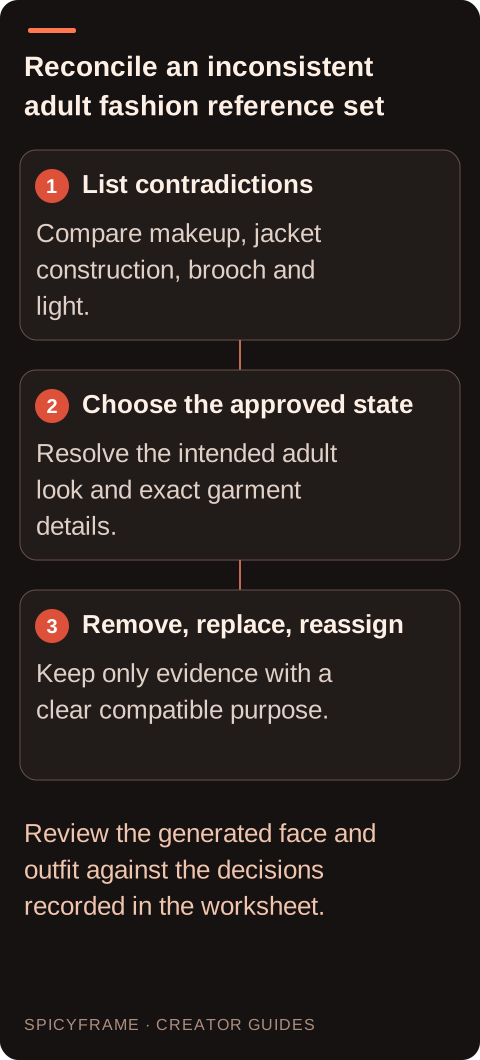
Same-color outfits are not necessarily the same outfit. Inspect lapel shape, button count, sleeve length, belt position and fabric finish across the candidate images. A brooch present in one photograph and absent in another is a concrete conflict that needs an approved decision. Record which styling is intended, then remove or replace the image that prevents a clear garment brief. If the conflicting file is the best face reference, retain it only with a clearly stated identity role and assess the remaining ambiguity honestly. The fashion video guide helps define which garment details matter. Do not treat written roles as a technical clothing lock; the actual generated jacket and accessories still need to be compared with the chosen evidence.
Compare light direction, contrast and visible reflections between the adult portrait and any setting reference. A soft window-lit face and a hard red-lit backdrop may ask for a substantial imagined relighting. Decide whether that change is intentional and authorized by the brief. If the goal is simply preserving the adult portrait, a more compatible setting image may reduce the contradiction. If the colored environment is essential, review the generated skin and garment colors as an interpreted result rather than an exact copy of both sources. The photo preparation guide supports source inspection. Remove decorative setting files that do not answer a real composition need, particularly when their perspective or light directly competes with the approved adult reference.
Imagine an authorized adult model has an approved close portrait, a full-length photograph in the same velvet suit and a simple studio backdrop image. Assign the portrait to likeness, the wider image to the exact outfit and the backdrop to the setting. Ask for one small shoulder turn under consistent soft light. Before submitting, notice that the full-length photograph includes a brooch absent from the portrait and decide whether it belongs in the final styling. This hypothetical preparation example is not a tested result. It shows why reference review should resolve visible contradictions before generation. Afterward, verify the brooch decision, jacket construction and face rather than assuming a clear role description guarantees every element will be preserved.
If the face resembles one source while the clothing drifts toward another, simplify the set before adding more images. Keep the strongest lead and one necessary supporting view, then restate their roles. If the background changes unexpectedly, remove a decorative setting image that conflicts with the portrait and reassess the composition. Change one meaningful variable at a time so the next result is easier to interpret, while acknowledging that separate generations vary. SpicyFrame has no seed control that makes two attempts an identical experiment. Preserve the original references and notes about why each was included. A smaller coherent set can make failures easier to diagnose even when it does not guarantee a better output. Create a reference contact sheet before upload when the set contains several similar adult portraits. Place the images together and write a short role beside each one: identity, jacket construction, full silhouette or setting. This often exposes a different earring, altered makeup or inconsistent light direction that is difficult to notice while opening files individually. Resolve those differences with the authorized creative reviewer rather than letting the generation choose silently. If two files have the same role and one is weaker, remove it unless it contributes a specific useful angle. Keep filenames or ordering notes stable so the prompt's role description continues to match the actual uploaded set. Recheck after replacing a file, because a previously clear instruction can become wrong when the associated image changes. For recurring fashion work, save the approved set as a project reference rather than collecting new unrelated portraits for every attempt. That practice improves organization and review consistency, but it should not be described as training a persistent adult character or guaranteeing that later clips will reproduce the same person and outfit exactly.
Check the adult likeness against the identity image, the garment against the outfit image and the environment against the relevant setting evidence. Watch the full motion, especially turns, occlusions and the ending, because one accurate opening frame does not establish continuity. Keep the scene within the approved non-explicit adult fashion purpose and verify that no unintended person or garment change appears. If the result is acceptable, save the selected reference set and role notes with the final MP4 for future projects. If it is not, identify which role failed before deciding on a retry. Additional references should answer a specific unresolved question, not serve as a reflexive response to every disappointing generation.
| Situation | Action | Verify |
|---|---|---|
| Makeup or time period disagrees | Choose the approved adult appearance | Remove or limit the conflicting portrait |
| Same-color jackets have different lapels | Identify the exact intended garment | Replace the misleading outfit source |
| Brooch appears in only one image | Decide whether it belongs in the styling | Verify the choice through the full clip |
| Portrait and backdrop light conflict | Choose preservation or intentional relighting | Compare skin and garment colors honestly |
| Two files duplicate one role unequally | Retain the stronger useful evidence | Every remaining file answers a real need |
A brief record of disagreements in adult appearance, garment, accessories and light, with the approved final state and a remove, replace or reassign decision.
Yes. Compare lapels, closures, sleeves and fabric rather than treating a shared color as proof of the same outfit.
Decide the intended accessory, limit that file to its identity role where appropriate, and review whether the remaining set is still clear enough.
Only when they serve a specific compatible role. Resolve time-period, hairstyle and makeup differences against the approved current representation.
No. Roles clarify the brief but do not enforce a face or garment lock; inspect the complete generated result.
Replace it when its required role still lacks clear compatible evidence after the conflicting source is removed.