Does a static-camera prompt guarantee no motion?
No. It describes the requested viewpoint, but the generated result still needs inspection for drift, reframing and perspective changes.
SPICYFRAME · PRACTICAL GUIDES
Write permitted adult fashion camera prompts that preserve the pose, outfit and setting, then check framing and motion in the generated clip.
5 seconds · 480p · $3.99. Pay per video, no subscription required.
Updated

Spicy-style camera prompts can describe permitted, non-explicit adult glamour through lighting, styling and composed movement. Start with an authorized adult reference and decide what the viewer needs to notice: the face, the cut of a jacket, a full outfit or the setting around the model. Then choose one camera intention that serves that information. A close portrait emphasizes expression; a wider fixed view preserves the outfit; a modest approach can focus attention. Avoid treating the camera as a way to isolate intimate body areas or imply exposure. The useful question is what changes in the viewer's understanding when the viewpoint moves, not how many cinematic terms can fit into the prompt.
Choose two or three landmarks: a background corner, the adult model's shoulder and an object near the foreground. Follow their positions relative to the frame edges. If only the person moves, the issue may be subject action rather than viewpoint. If everything shifts together, a global translation or reframing may be a useful description. If spatial relationships change, the sequence may depict a moving viewpoint or contain distortion. These are practical visual categories rather than a technical diagnosis of the generation system. The camera movement guide provides vocabulary for the intended shot so you can compare the requested effect with the one actually visible.
Write the adult model's action and the camera's action as distinct ideas. “The adult model makes a small shoulder turn while the camera holds a steady medium portrait” gives each a clear role. If you want a slow approach, keep the pose restrained so two kinds of movement do not compete. Remove conflicting requests such as locked framing, orbit and close-up reveal in the same short clip. The camera movement guide explains the general vocabulary. SpicyFrame interprets a written brief but does not provide a mechanical camera lock, path editor or seed control, so inspect the generated result rather than assuming the words enforce a precise route.
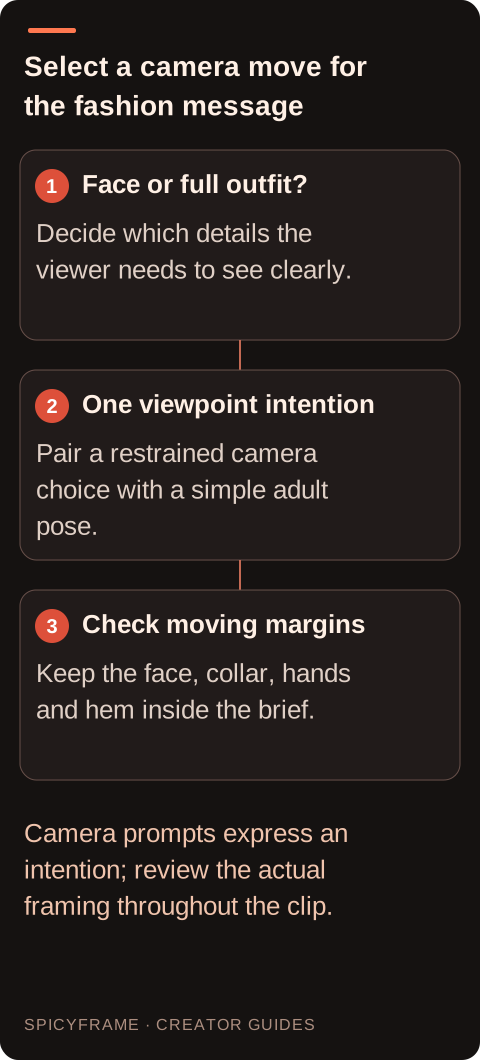
A structured jacket benefits from enough space to show shoulders and lapels. A full-length evening outfit needs headroom and room below the hem. A close beauty reference cannot reliably supply the same outfit information as an authorized wider photograph. Plan the camera around the visible evidence and the intended movement. The vertical composition guide explains the narrow 9:16 canvas used by SpicyFrame. A landscape source does not enable landscape output, and a request to pull back does not guarantee accurate reconstruction of missing clothing. If the complete outfit matters, select a source that already shows it clearly before asking the camera to reveal more.
A stable crop can sometimes compensate for small global drift. It cannot make a bending wall or changing face structurally consistent. Before editing, inspect whether rigid objects preserve their shape as they move. If they do, an external correction may be worth testing. If they stretch independently, revisit the scene or reference instead of assuming stabilization will solve the problem. Also note whether the unwanted motion is smooth or abrupt: a slow drift may be easier to accommodate through reframing than a sudden jump. The artifact guide helps when apparent camera movement is mixed with local distortions that require a broader revision.
For a portrait: “Authorized adult model in a velvet evening jacket, slight glance toward the window, steady medium framing, soft side light and quiet room ambience.” For an outfit: “Adult model in the reference takes one small step and settles, full outfit remains visible, restrained camera movement, consistent studio light.” For an accessory: “Adult model holds the approved clutch at waist height, subtle shoulder shift, gentle approach that keeps face and clutch in frame.” These are hypothetical fashion directions, not tested results or guaranteed camera paths. Choose the one that matches the reference, remove unsupported details and judge the actual output for likeness, garment continuity and comfortable framing.
A separate editor may reposition frames to reduce unwanted camera movement. That process can require cropping or filling edges as the image shifts. Review how much usable space remains around the subject, especially in a narrow vertical clip. A correction that steadies a background but cuts off the top of a fashion accessory is not an improvement for that brief. Apply the effect to a duplicate and inspect corners, straight lines and moving limbs for new artifacts. SpicyFrame has no built-in timeline or stabilization panel. A stabilizer can be useful for modest global motion, but it should not be described as an automatic repair for generated perspective changes or scene reconstruction. Use the garment's defining line as a framing reference. For a wide-lapel jacket, watch whether both lapels remain comfortably visible as the adult turns. For a long coat, track the hem and the space below it. For a portrait with statement earrings, preserve enough width that the accessory does not repeatedly leave the edge. This produces a more useful camera instruction than a generic demand for a cinematic result. It also clarifies when a viewpoint change is unnecessary: if the essential information is already readable, a small subject movement may carry the scene on its own. Compare a proposed approach with a fixed view in the storyboard before ordering separate generations. Ask what the closer position reveals and what it removes. A push toward the face may improve expression while losing the outfit detail that justified the shot. Choose that tradeoff deliberately. If several fashion details must all remain visible, a stable wider composition can support them more clearly than a complex move, while still allowing rich light, texture and a restrained authorized adult pose to create the desired mood.
Sometimes a clip stays correctly framed for most of its duration and drifts only at the end. An external trim can preserve the successful portion if the action reaches a natural stopping point. Alternatively, a planned cut to a detail view can turn an unwanted approach into a transition, but only if the second shot belongs in the sequence. Do not extend a flawed ending merely to fill the original duration. The storyboard guide helps identify where a cut supports the viewer's understanding. Save the unmodified version so the edited timing can be compared with the original and revised if the new cut feels abrupt. Write a measurable goal before rendering: the complete collar stays visible, the adult face remains readable, or the hem never leaves the frame. Watch the result at normal speed and compare the opening, largest movement and ending. If the camera drifts, first remove conflicting scene directions or reduce the action. A separate editor can sometimes trim or stabilize modest global movement, but the studio has no built-in timeline or stabilization tool. The storyboard guide helps decide whether an external cut is appropriate. Keep the approved fashion purpose central: an elegant, coherent viewpoint is more useful than a dramatic move that loses the outfit or changes the depicted adult's appearance.
| Observation or goal | Recommended next step | What to verify |
|---|---|---|
| Subject grows until cropped | Review close-up or reveal wording | Comfortable margins through the clip |
| Background and subject shift together | Consider external stabilization | Cropping does not remove key content |
| Only the person changes position | Review subject action | The camera diagnosis matches the evidence |
| Walls bend during movement | Reassess geometry and scene complexity | Rigid shapes remain coherent |
| Drift occurs after the action ends | Trim in a separate editor | A natural final composition |
No. It describes the requested viewpoint, but the generated result still needs inspection for drift, reframing and perspective changes.
Track background and foreground landmarks as well as the subject. Their relative motion gives a clearer picture than watching the face alone.
Often it needs extra crop or edge treatment. Verify the resulting frame before accepting the correction in an external editor.
SpicyFrame has no separate negative-prompt control. Clarify the desired composition and remove conflicting movement cues from the main prompt.
It may give more compositional room, but it does not guarantee a fixed viewpoint. Treat it as a focused experiment.
When the useful portion completes the intended action and the unwanted movement begins afterward, a natural external trim may be enough.