Why does the loop jump when the first and last stills match?
The direction or speed of movement may differ at the join. Compare several moments around each boundary, not just the two stills.
SPICYFRAME · PRACTICAL GUIDES
Diagnose failed adult glamour loop joins by comparing earring motion, garment edges, lighting and audio, then test a precise external seam edit.
5 seconds · 480p · $3.99. Pay per video, no subscription required.
Updated

An adult glamour loop can have almost matching first and last stills and still jump visibly when it repeats. The missing comparison is often motion: an earring is travelling left at the end but right at the start, a sleeve is settling before suddenly rising, or the adult model pauses before the next glance. Begin with the failed join and watch several repetitions rather than rewriting the whole prompt immediately. Use authorized, non-explicit adult fashion footage. This guide focuses on seam diagnosis; the basic loop tutorial covers broader planning. SpicyFrame has no endpoint controls or built-in loop editor, so trimming and seam experiments are performed in a separate editing application.
Choose the most conspicuous moving accessory, such as a long earring or a narrow necklace pendant. Compare its position near the boundary, then inspect the few moments leading into and out of the join. A similar position can belong to two opposite phases of a swing. If the earring arrives moving downward and restarts moving upward without a plausible turn, the eye may notice a twitch. Move the external cut point slightly and review whether the direction becomes more coherent without damaging the facial expression. This is a practical visual comparison, not a claim that the motion follows a measurable physical model. Keep the approved jewelry design intact while deciding whether the accessory movement can repeat convincingly.
For an adult eveningwear loop, inspect collar edges, jewelry, hair and the background line behind the shoulders. These details provide visual anchors at the join. A long dangling earring or rapidly moving fabric can create extra differences even when the face returns to a similar pose. Prefer a source that makes the intended small movement understandable. If multiple images are used, keep the adult identity, garment and lighting compatible. The multiple-reference guide explains reference roles, but additional uploads do not create endpoint conditioning. SpicyFrame accepts up to 12 authorized JPG, PNG or WebP images under 10 MB each; use only those that clarify the specific looping scene.
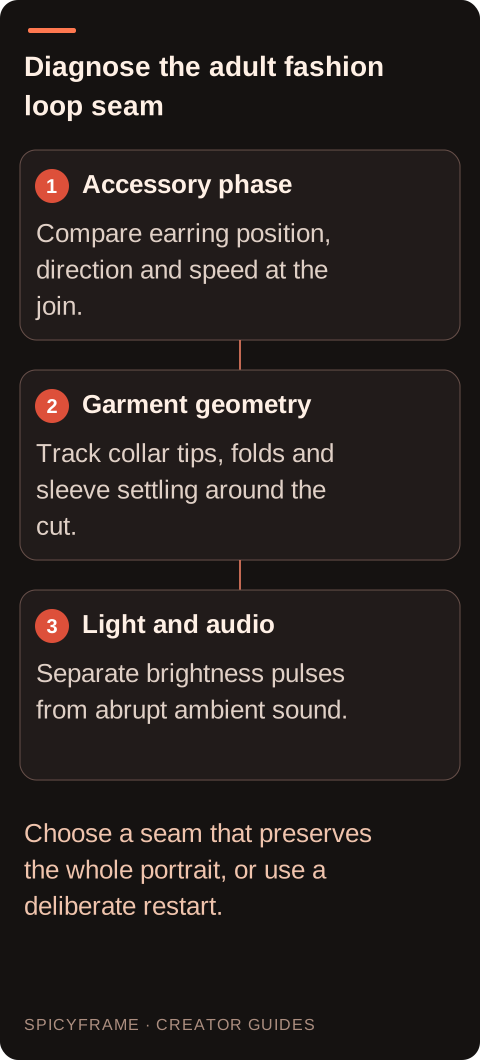
A lapel may occupy the same screen area at both boundaries while its fold or highlight points in a different direction. Compare the collar tip, shoulder seam and visible sleeve edge as connected shapes. Check whether fabric is still settling into the ending pose when the beginning suddenly returns to an earlier crease. A dissolve can produce overlapping lapels rather than hiding that mismatch, so test the transition on moving footage. If the garment construction itself has changed, the issue is continuity rather than a seam that trimming can reliably fix. Use the approved fashion source to determine which shape belongs in the clip. The fashion prompt examples help simplify a future garment gesture if the current sequence has no coherent return.
Import the completed MP4 into a separate editor and compare candidate starting and ending moments. The best interval may be shorter than the full generation. Look for similar face angle, shoulder position, garment edges and brightness, then listen for any abrupt audio reset. SpicyFrame has no built-in timeline or loop-trimming control. A short dissolve may hide a small brightness difference but can create double outlines around hair and earrings, so test it rather than assuming it helps. Keep a clean original and a separate loop export. If the action cannot return convincingly, a deliberate repeated cut may be clearer than an artificial transition that makes the adult portrait appear to melt.
Imagine a five-second authorized adult portrait in a velvet jacket. The face returns forward, but the long earring is still swinging when the clip ends. First compare several frames around each boundary: identify the earring position, direction and whether it is speeding up or settling. Next test an earlier endpoint with a closer movement phase, then check whether the collar and gaze still match. If the accessory improves but the face jumps, restore the previous cut and try a different start point. If no pair works, choose a deliberate restart or revise the gesture rather than forcing a dissolve. This hypothetical sequence is not a tested repair. It demonstrates that the best seam balances the complete adult portrait, not only the accessory that first revealed the problem.
Scrub the last part of the clip and identify moments where movement settles, anatomy remains coherent and the subject aligns with the next shot. The strongest editorial endpoint may occur before the file ends. Compare several candidate frames side by side with the intended next image. Check scale, gaze direction, object position and major lines. If a frame looks acceptable only in isolation but follows an awkward motion, choose another. Keep a short range around the preferred point so the final cut can be adjusted by feel. This approach treats the generated clip as source material for editing rather than assuming its last decoded frame is automatically the right storytelling boundary. Make a seam inspection strip with a few moments before and after the proposed cut in the external editor. Choose landmarks that belong to different parts of the portrait: the earring tip, a lapel notch and a point on the background. If only the earring reverses abruptly, try a small boundary adjustment. If every landmark shifts together, the camera or overall framing may be the stronger seam cue. If the lapel changes shape while the other landmarks match, a different interval may be necessary. This comparison prevents an accessory fix from being applied to a global movement problem. Also watch the apparent breathing rhythm around the cut. A chest-and-shoulder rise that restarts halfway through can create an unnatural repeated hitch in an otherwise non-explicit adult fashion pose. Do not demand a physically exact cycle; judge whether the repeated movement remains comfortable and coherent. If several independent rhythms never align, simplify the next shot by reducing accessory movement or the gesture itself. A loop with fewer moving elements can retain the same styling while offering more usable boundary choices.
After the pose and garment agree, compare background brightness and skin illumination around the seam. A small exposure difference can create a pulse on every repetition even when the geometry is close. An external adjustment may help a global brightness mismatch, but review skin and satin highlights so the correction does not flatten the fashion lighting. Then listen without watching: an ambient swell, clipped footstep or sudden room-tone change can announce the join independently of the picture. Keep audio decisions in the external editor and use authorized replacement material if needed. Finally, watch several repetitions at the intended viewing size. Check the adult likeness, earrings, collar and sound together, because fixing one seam cue may make another more apparent. Preserve the original MP4 and the accepted cut positions in the editing project. The storyboard guide helps determine whether a repeated fashion moment still serves the wider presentation. A slightly visible but intentional restart can be preferable to a smooth-looking transition that alters the face or garment.
| Observation or goal | Recommended next step | What to verify |
|---|---|---|
| Earring jumps despite matching position | Compare swing direction around both boundaries | The movement phase agrees |
| Collar overlaps during a dissolve | Inspect geometry and try another interval | One coherent garment shape |
| Sleeve stops then rises abruptly | Compare settling movement and cut timing | The fabric rhythm remains plausible |
| Background pulses at each repeat | Check boundary brightness externally | Skin and satin highlights stay natural |
| Picture loops but sound clicks | Review the audio join separately | No abrupt ambience or clipped cue |
The direction or speed of movement may differ at the join. Compare several moments around each boundary, not just the two stills.
Track its position and swing direction before and after the cut, then test nearby start or end points externally.
It may create double edges instead. If garment geometry changes, choose another interval or a different take.
Yes. A clipped sound or abrupt ambience change can repeat noticeably even when the picture appears continuous.
No. It has no endpoint controls or built-in loop timeline; evaluate and trim the downloaded clip externally.
When no coherent seam preserves the approved face, outfit and movement, a clear repeated cut may be the more honest result.