Plan a studio glamour video with clothed adult fashion, simple backdrops, clear light direction and stable garment detail, plus practical review checks.
5 seconds · 480p · $3.99. Pay per video, no subscription required.
Updated
AI-generated editorial illustration: an adult fashion look in red city light. This is a styling reference, not a video-generation result.
Use studio glamour to simplify the fashion brief
Studio glamour photography offers a controlled starting point for an adult fashion video: a clear subject, a deliberate backdrop and light chosen to explain the face and outfit. Use authorized references of consenting adults in complete clothing, and define glamour through styling, expression and polished presentation. A simple scene is not an empty scene. It gives the viewer fewer distractions and makes continuity errors easier to spot. Decide whether the clip should emphasize tailoring, a portrait expression or a garment’s movement. That single purpose should guide the pose and camera before you add dramatic light effects, props or elaborate background changes.
Select a backdrop that separates the outfit
A gray backdrop can suit many garment colors, while a pale wall may lose the edge of a white jacket. A dark background can emphasize a light outfit but merge with black sleeves. Choose separation based on the actual reference rather than a generic preference for dramatic contrast. A textured paper or fabric backdrop adds visual interest but also more patterns that can shift during generation. For a first test, a smooth background makes it easier to identify whether the subject is moving or the whole frame is drifting. Keep the floor transition visible when feet matter, and inspect whether it stays attached to the backdrop rather than changing shape.
Describe the light relationship without invented controls
You can request a soft key light from one side and gentle fill on the other, but SpicyFrame does not expose a lighting console or numerical ratio control in this workflow. A phrase such as “soft side light with readable shadow detail” communicates the visual aim more directly than an unsupported technical setting. The lighting guide explains useful source vocabulary. If you discuss a lighting ratio in a production brief, treat it as an external art direction reference rather than a guaranteed generator parameter. Check the reference’s existing shadows so the new request does not accidentally ask for contradictory sources on the face and garment.
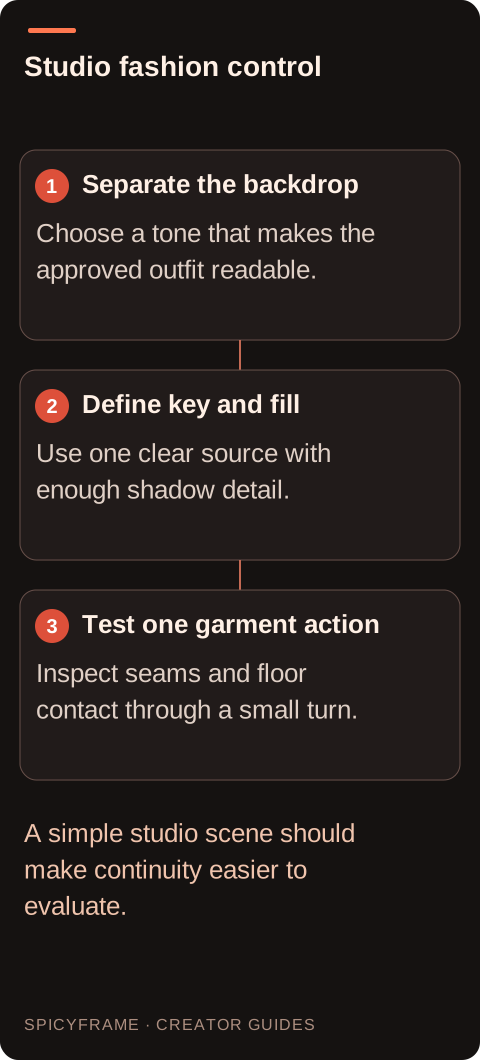
Separate the backdrop: Choose a tone that makes the approved outfit readable.. Define key and fill: Use one clear source with enough shadow detail.. Test one garment action: Inspect seams and floor contact through a small turn.. A simple studio scene should make continuity easier to evaluate.
Choose an action that reveals the garment
A small shoulder turn can show the structure of a blazer, while a gentle step can show how a trouser leg or skirt hem moves. An upright seated portrait may suit a close study of collar and expression. Keep hands in clear positions and avoid intricate adjustments unless the garment detail requires them. The portrait guide helps define subtle expression changes. For studio fashion, ask what the action tells the viewer about the outfit. If it adds no useful information, let the pose remain quiet. A dramatic spin may produce more movement, but it also reveals unseen fabric surfaces and makes exact wardrobe review harder.
A prompt for a focused studio study
A proposed brief might say: “Use @Image1 for the consenting adult in the burgundy tailored suit. Plain warm gray studio backdrop, soft key light from camera left and gentle fill that keeps the lapels readable. One small shoulder turn and a relaxed expression, locked camera, quiet room ambience.” This is a hypothetical five second study, not a tested result. @Image1 clarifies the reference role without guaranteeing identity or clothing fidelity. Avoid asking for a new backdrop color, a spotlight sweep and a full walk in the same first attempt. If the lapel changes shape, a simpler action is a more targeted revision than adding more style adjectives.
A hypothetical lookbook decision process
Imagine a designer preparing three short adult fashion portraits for a lookbook. The first source shows a structured jacket against a gray wall. Before generating all three, test that one look with a small turn and record the accepted backdrop tone, light direction and crop. Check the collar, buttons and shoulder line through the whole clip. If those details remain unsuitable, revise the reference or movement before repeating the setup with other garments. This is a proposed workflow, not a claim that one accepted prompt will guarantee consistent future outputs. The storyboard guide can help document the shared visual choices for a later external sequence.
Review the plain background as a diagnostic tool
A simple backdrop makes camera drift, exposure flicker and edge distortion more visible. Watch the outline of hair and sleeves against the background, especially during the turn. Check whether the floor shadow follows the feet and whether the adult appears grounded rather than floating. Look for a backdrop seam that bends or moves without a camera reason. Review the face at the same moments as the garment so a stable outfit does not distract from changing identity. A clean background is useful precisely because it does not conceal these problems. Reject a polished looking frame if the full movement fails the agreed fashion or portrait criteria.
Match delivery choices to the approved study
SpicyFrame outputs vertical 9:16 MP4 clips with ambient audio in 5, 10 or 30 seconds. Medium 480p can test composition, while High 720p and Ultra 1080p provide more detail for an accepted direction; none guarantees stable garment construction. A quiet studio clip may benefit from external audio removal or a licensed soundtrack, since generated ambience should be reviewed rather than assumed silent. Use the fashion guide to decide how the study fits a broader presentation. Keep exact product claims separate from artistic interpretation, and obtain approval for the final crop, sound and caption. The finished clip should remain an authorized adult fashion portrait with a clearly understood AI treatment.
Studio glamour video: planning decisions
Choice
Use when
Acceptance check
Smooth gray backdrop
The garment needs neutral visual separation
Edges remain clear without texture shimmer
Soft side key
Tailoring and facial shape should be readable
The bright side stays consistent during the turn
Gentle fill
Dark fabric loses detail in shadow
Lapels and cuffs remain distinct from the torso
Small shoulder turn
One garment feature should gain depth
Seams and proportions stay stable
Shared lookbook setup
Several clips need a coherent editorial style
Backdrop, crop and light agree across accepted clips
AI image-to-video questions answered
Does studio glamour need dramatic lighting?
No. Soft directional light and a simple backdrop can create a polished adult fashion portrait. The light should serve the face and garment. Strong contrast is useful only when the important details remain readable throughout the movement.
Can I set an exact lighting ratio?
This workflow does not assume a numerical lighting ratio control. You can describe the desired contrast and fill in words, then inspect the result. Exact ratios belong to a conventional lighting setup or a separately controlled production process.
Which backdrop is easiest to review?
A smooth backdrop that contrasts with the outfit makes edges and drift easier to see. Choose it around the actual garment: white on white or black on black may hide important contours unless the light provides enough separation.
Should I generate every look immediately?
Test the shared visual direction with one representative outfit first. That can reveal problems with framing, light or movement before you commit to a larger batch. An approved first clip still does not guarantee later outputs will match.
Why does the adult seem to float?
Feet, floor shadows or the backdrop transition may be inconsistent. Use a source with clear ground contact and reduce movement. Inspect contact points throughout the clip, especially when a foot lifts or the camera changes perspective.
Can this replace accurate lookbook photographs?
A generated editorial can complement a lookbook, but it may alter fit, color and construction. Use appropriate real product evidence for factual garment claims, and describe the AI treatment so viewers understand what the video represents.