Pay as you go
One scene?
Start with piments.
Top up your wallet once. Use piments when you want. No subscription required.
Create from 399 piments ↗ SPICYFRAME
18+ · Two consenting adults
Make an AI couple video from one photo of the two of you, or from one portrait of each: a slow dance, two hands meeting on a table, a walk at golden hour or an anniversary keepsake, rendered by Seedance 2.5 as a vertical 5, 10 or 30-second clip with ambient sound. Both people must be adults who agreed to this use of their photos; romance is the brief, never explicit content.
Select one or more models for a duo or group video. Describe who appears in your prompt.
Imported photos follow stricter rules to protect real people: consenting adults only, no celebrities, no one without their consent. Gallery models and AI avatars are invented characters, so these rules do not apply to them. Minors are always forbidden.
Type @ to mention an image in your scene.
Choose an idea to add it. Your existing text is kept.
Your data is protected under the GDPR: used only to run the service, exportable and deletable at any time. Privacy
If generation fails, you get refunded.
Secure payment by SumUp
One payment, no subscription required. Piments are deducted once and your balance is saved to your account. Guest videos are never added to a library; previously saved files can be deleted in Settings.
Generated with Seedance 2.5 by ByteDance: strong face, outfit and style consistency with your reference photos.
Upload your references, describe the scene and choose your length. Your clip appears right here.
Loading…
Signed-in orders are available across devices. Guest orders need this browser’s session. Rendering time varies; no fixed countdown is promised.
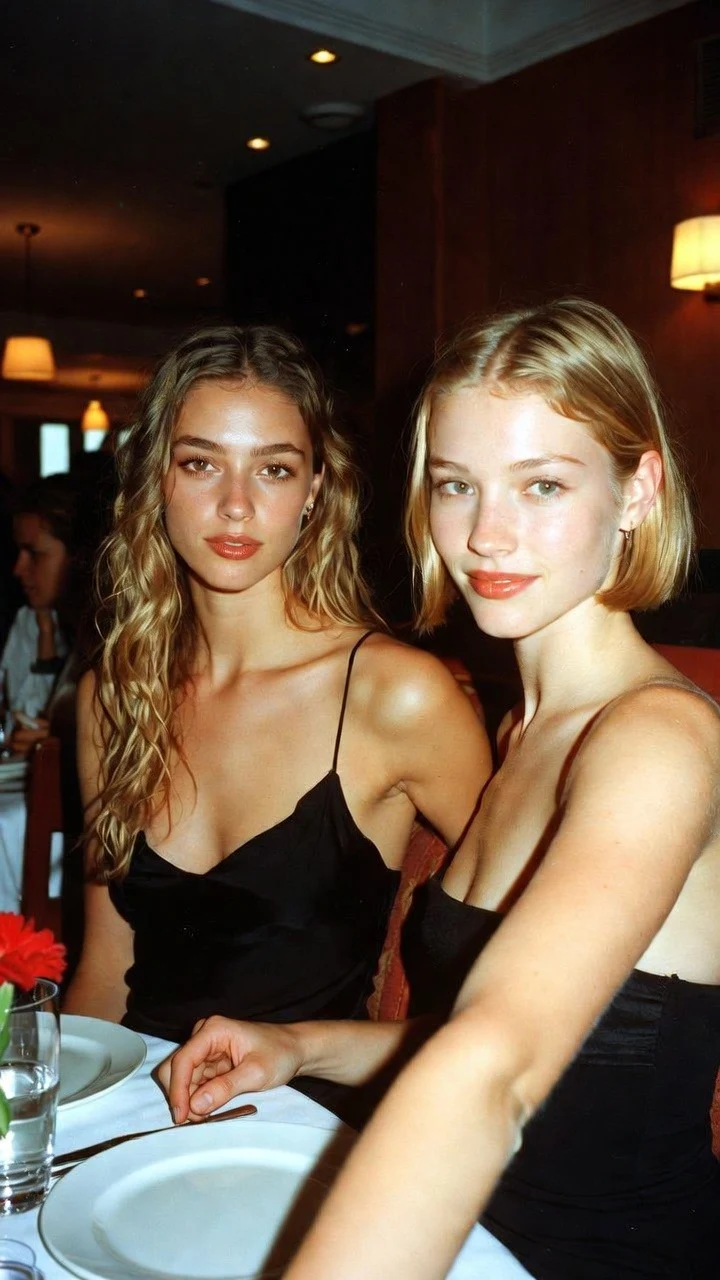
This demo is not a couple scene: it shows two adult friends at dinner. It is here because it answers the first question about couple videos — can one photo with two faces stay recognisable through a moving shot? Compare the photo and the clip, then look at both faces, not only the nearest one. An exact likeness is never guaranteed.
 PhotoAI video
Everything happens in the studio at the top of the page, and the price is shown on the button before anything is charged.
Upload one photo of the two of you together — the most reliable start — or one portrait of each person. You can add a third photo for the place. Fictional adult models are under “or select a model”. The first reference becomes @Image 1, the second @Image 2.
Give each person a place, then one gentle action, one camera move, the light and the sound: “@Image 1 on the left, @Image 2 on the right, they slow dance in a living room, her head on his shoulder, locked medium shot, string lights, soft room tone.”
Try five seconds in Medium 480p (€3.99) first. When both faces hold, render ten seconds in High 720p (€8.99) or Ultra High 1080p, pay as a guest or with piments, and watch the whole clip before you download it.
Each prompt describes one moment, not a story. Load it with the button, adjust the place to your photo and keep the camera calm.
@Image 1 and @Image 2 sit at a candlelit restaurant table, @Image 1 reaches across and takes the hand of @Image 2, they smile at each other, slow push-in, warm light, soft cutlery sounds.
Hands on a table are easier for the model than full bodies: a safe first test.
@Image 1 and @Image 2 slow dance in a living room, foreheads close, gentle sway, locked medium shot, string lights, quiet room tone.
Give it ten seconds so the sway can settle.
The couple in @Image 1 walk along a beach holding hands, waves at their feet, slow side tracking shot, golden hour, sea breeze.
For one photo of the two of you together.
@Image 1 and @Image 2 rest their foreheads together on a balcony, eyes closed, slow orbit, city lights at night, distant traffic.
@Image 1 and @Image 2 share one umbrella on a city street, laughing, slow push-in, neon reflections, sound of rain.
@Image 1 offers @Image 2 a strawberry on a picnic blanket in a sunny park, both laugh, slow push-in, birdsong, light breeze.
The couple in @Image 1 turn to face each other at their wedding, both smile and hold hands, slow orbit, string lights, guests murmuring in the background, keep both faces unchanged.
Locked camera, the couple in @Image 1 smile at the camera and lean their heads together, constant soft light, gentle breeze.
Easy to trim into a loop for an invitation or a slideshow.
A couple clip shows intimacy between two real people, so consent is the first step, not a footnote. Check every point before you upload:
Before every generation you confirm that any identifiable real person is 18 or older and agreed to the transformation. That declaration is recorded with your order; it is your statement, not a check of the other person’s consent, so the responsibility stays with you.
The couple clips worth making are the ones both people would happily watch together: an anniversary keepsake from your favourite photo of the year, a wedding or engagement teaser, a save-the-date loop, a travel memory on a pier or a mountain path, a Valentine’s Day or birthday surprise you agreed to make together, or a short clip for a long-distance partner who knows about it. A real place and a real occasion make a better clip than a generic pose.
This page covers romance that is not a hug or a kiss: dances, hands, glances and walks. For an embrace, the AI hug video page has prompts tuned for arms and reunions; for a gentle kiss, see the AI kissing video generator. The same method works for any two consenting adults, whatever their genders.
Two people in one shot give the model twice as many details to keep. Most problems have a known cause.
| What you see | Likely cause | What to change |
|---|---|---|
| The two faces blend | Blurry references or a third person among them | Use sharp front or three-quarter portraits, remove extra references and add “keep both faces unchanged” |
| The two people swap sides | The prompt never says who stands where | Write “@Image 1 on the left, @Image 2 on the right” |
| The dance looks stiff | Too many actions for the length | Keep one slow action — “gentle sway”, “a brief moment” — or move to ten seconds |
| Heights or proportions look off | Two portraits taken at different distances | Use one photo of the couple, or two portraits with similar framing |
| The background changes | No reference for the place | Add a photo of the place as a third reference |
Avoid extreme close-ups, which make any blending more visible; a medium shot with a slow orbit or push-in is the safest choice.
The price depends only on the length and the quality — not on the number of people or photos. All nine options:
| Length | Medium · 480p | High · 720p | Ultra High · 1080p |
|---|---|---|---|
| 5 seconds | €3.99 | €4.99 | €11.99 |
| 10 seconds | €4.99 | €8.99 | €23.99 |
| 30 seconds | €11.99 | €24.99 | €70.99 |
From the terms of use: the same rules apply to every length and quality.
Your rights declaration is recorded with each order. Before uploading you also choose whether new photos and videos are kept in your private library.
Yes. One photo of the two of you together is the most reliable input: the model already sees how your faces, heights and light relate, and only adds the movement, the camera and ambient sound.
Yes. Upload one portrait of each person, name them @Image 1 and @Image 2 and say who stands on the left. The model has to invent how you stand together, so expect a retry or two.
No. Both people must have agreed to this AI transformation. An ex or a crush who never said yes has not, and celebrities and other public figures are not allowed.
Yes, any two consenting adults. The fictional models in the studio library are all women for now; for anyone else, upload a photo of a consenting adult.
A gentle kiss, yes, on the AI kissing video generator page. Explicit content, never: nudity and sexual acts are against the terms and can be refused by the video provider’s checks.
No, SpicyFrame is not free. Each video costs from €3.99 for five seconds in Medium 480p to €70.99 for 30 seconds in Ultra High 1080p, shown before you pay, with no subscription.
Not in the studio: each clip has ambient sound without music. Add a licensed song afterwards in your editor or from the platform’s sound library.
More on two-person scenes, kisses and reference photos.
Page reviewed by the SpicyFrame team · Updated · Terms · Privacy · Data controls · Safety & compliance
Create your way
Top up your wallet once. Use piments when you want. No subscription required.
Create from 399 piments ↗Secure payment by SumUp
18+ · Adults only
You must be 18 or older to enter. Use only images you own or have permission to transform, featuring adult subjects and, for identifiable real people, their consent. Deepfakes of real people without their consent are strictly forbidden.
Privacy · Terms of use