Plan an AI dating profile video from your own adult portrait, with recognizable features, modest movement and clear disclosure of meaningful alterations.
5 seconds · 480p · $3.99. Pay per video, no subscription required.
Updated
AI-generated editorial illustration: an adult fashion look in red city light. This is a styling reference, not a video-generation result.
Use an AI dating profile video to represent yourself honestly
An AI dating profile video should begin with your own authorized adult portrait and a clear intention to remain recognizable. The useful question is not whether the clip looks impressive in isolation, but whether another person would reasonably understand who they are meeting and how the image was made. A small animated smile can be a creative presentation. A changed face, body, age or invented life event can create a misleading impression. Keep meaningful alterations visible in your description and check the dating service’s current rules before uploading. This guide focuses on identity and reference planning, not promises about matches, attraction or platform acceptance.
Choose a recent source that reflects your current appearance
Use a clear photograph showing your present hairstyle, facial features and ordinary proportions. A heavily filtered or old image makes the animation less useful for honest self representation. Wear a complete outfit that fits the profile you intend to present, and avoid changing it into something that implies a profession, status or activity you do not have. If someone else took the photograph, confirm that you may use and transform it. Remove unrelated people and private details through an authorized preparation process. The selfie guide helps with phone framing, but the key dating profile criterion is whether the source already represents you accurately.
Separate animation from identity alteration
A blink, small smile or gentle head turn changes the moment without necessarily changing the person. Requests for a different jaw, substantially different body or younger appearance change the identity claim the profile makes. Decide your limits before generating and write them in a short review note. The system may alter features even when you did not ask, so compare the whole clip with the source. The identity guide explains what to inspect. Do not assume that a flattering result is acceptable because the prompt said to preserve the face. Your final review, rather than the wording alone, determines whether the video remains an honest representation.
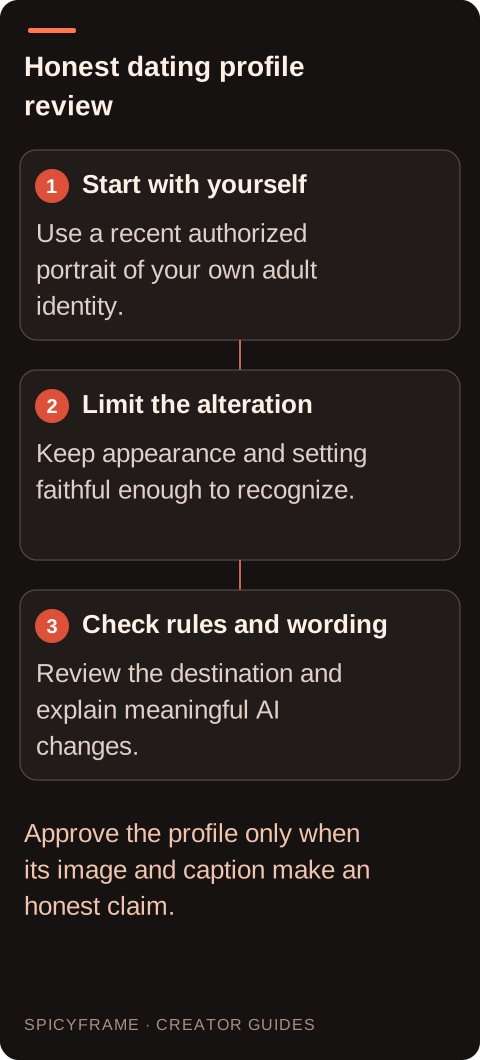
Start with yourself: Use a recent authorized portrait of your own adult identity.. Limit the alteration: Keep appearance and setting faithful enough to recognize.. Check rules and wording: Review the destination and explain meaningful AI changes.. Approve the profile only when its image and caption make an honest claim.
Keep setting and action modest
A simple home or neutral portrait background reduces the chance of implying an invented trip, expensive property or event. If you use a fictional setting, say so where it could affect how viewers interpret your life. A generated restaurant, mountain or luxury car is not evidence that you were there or own it. Choose one natural expression rather than a long performance. The portrait guide can help define a restrained action. SpicyFrame creates ambient audio, not a cloned voice or guaranteed scripted speech. Do not use an unexpected generated voice as if it were your own recorded introduction.
A prompt centered on recognizable self presentation
A proposed brief might say: “Use @Image1 for my adult identity, current hairstyle and blue shirt. Keep the original neutral background and close portrait framing. One small relaxed smile and natural blink, minimal head movement, steady soft light, quiet room ambience.” The source role is clear, but likeness remains something to inspect. Avoid requesting a personality or social outcome such as making viewers trust you; describe the visible behavior instead. A five second test can be enough to review expression. If the result changes your teeth, eye shape or face proportions, reject it for profile use even if the image looks polished.
A hypothetical profile review decision
Imagine an adult user wants to animate a recent portrait taken with permission by a friend. They compare the source and candidate clip at the beginning, smile midpoint and end. Their acceptance note says the hairline, glasses, face shape and shirt should remain recognizable, with no new background claims. If the generated smile produces a different face, they choose a smaller expression or use the original photograph instead. They also prepare a plain caption such as “AI animated from my photo” if that accurately describes the process. This is a proposed review method, not a claim that a dating service accepts the format or that the clip improves results.
Check the destination’s current rules before posting
Dating services can have different rules for authenticity, manipulated media, profile formats and disclosures, and those rules can change. Read the current official help and terms for the service you intend to use. This guide does not assert a universal rule or claim that a disclosure always makes an otherwise prohibited upload acceptable. If the service does not support a video or does not allow the intended alteration, use an allowed format. Keep the profile’s text, images and video consistent with one another. The privacy guide also helps you consider what personal information belongs in a source file and what you actually need to share publicly.
Approve the final file and caption together
SpicyFrame exports 5, 10 or 30 second vertical 9:16 MP4 clips with ambient audio at Medium 480p, High 720p or Ultra 1080p. Confirm the destination’s accepted format separately instead of assuming every profile supports this output. Review the audio and remove unsuitable sound externally if needed. A higher resolution does not make an altered identity truthful. Keep a copy of the source, the approved clip and the exact disclosure so you can explain the transformation consistently. If no candidate remains a fair representation, a normal recent photo or an actual recorded introduction may better meet your goal. The useful outcome is an honest profile, not generation at any cost.
AI dating profile video: planning decisions
Choice
Use when
Acceptance check
Recent adult portrait
The profile should reflect current appearance
Face, hair and proportions remain recognizable
Small expression
A little motion adds personality without a new identity
Smile and blink do not materially change features
Neutral setting
The clip should avoid invented lifestyle claims
Background does not imply untrue travel or ownership
Clear process caption
Viewers might mistake animation for live footage
The wording accurately describes meaningful AI alteration
Destination review
A specific dating service will host the profile
Current official rules and format support have been checked
AI image-to-video questions answered
Can I use someone else’s attractive portrait?
No. A dating profile should represent the adult using it. This workflow is for your own authorized portrait, with meaningful alterations disclosed. Using another person’s face would undermine the identity claim and may violate the service’s rules.
Does a disclosure make every AI video acceptable?
No. Disclosure is one part of honest presentation, not a blanket permission. Check the destination’s current official rules for manipulated media, authenticity and supported formats, and follow any applicable requirements for the specific service.
Can I make myself look younger?
For an honest dating profile, avoid changes that materially misrepresent your current appearance or age. Even an unrequested change should be reviewed critically. A recent source and a small expression give a clearer basis for recognizable self presentation.
What should the caption say?
Use plain wording that accurately describes the process, such as “AI animated from my photo,” when that is true. Mention meaningful changes to setting or appearance if they affect interpretation, and check whether the service requires a particular disclosure mechanism.
Can the video introduce me in my voice?
SpicyFrame provides generated ambient audio, not voice cloning or a guaranteed spoken script. Use a real authorized recording and a suitable external editing workflow if you need your own spoken introduction, subject to the destination’s rules.
Will this improve my dating results?
There is no evidence or guarantee offered here. The guide’s purpose is to help you remain recognizable, honest and within the relevant rules. Evaluate the clip by those criteria rather than assuming a more polished image produces better outcomes.